That said, the large primary display this uses is $2000. That's very hard to justify for any "normal" household, and that's without any mounts, backend, services etc.
edit: https://github.com/sibbl/hass-lovelace-kindle-screensaver
I can vouch for the reTerminal: the build quality is excellent, and they come with a battery, sd card reader, and some sensors: https://www.seeedstudio.com/reTerminal-E1001-p-6534.html
I love my original one and am planning to get a model X when budget permits
Well, it's cool, but the usability of it all is below average.
Declutter your life and don't install any more screens in your home ;)
Versus.
Just look at screen.
The equivalent of having the app open on your phone.
What if you are on a bus?
This is much more useful compared to that
I’ve been following Information Radiators since practically the beginning, and wiring has always been one of its problems. First networking and now power. In homes, but also in office spaces. The best locations for radiators are often the worst for wiring.
And eInk displays move the needle because you have a device that can go completely to sleep between updates, which means it can trickle charge.
We have several kids and have been organizing our daily todos and calendars on it for several years. We used to drop the ball quite a bit due to a hectic schedule and the dashboard has helped us tremendously. Since it is mounted in the kitchen, being able to pull up recipes is a plus.
I think I need a bigger kitchen, haha.
That sounds really cool, though. I'm currently trying to "train" our kids to manage their own schedules, e.g. reminding me that they have somewhere to be instead of vice versa.
Maybe a wall-mounted solution would help put it front and center for them.
  * Is it any month other than May-August?

  * Is it after 10am or before 4pm?
If you have very light skin you might want to increase the timeframe by an hour.
And if you really want to optimise your sunscreen usage and not use it if you don't have to, the real-time UV index from ARPANSA is the way to go (https://www.arpansa.gov.au/our-services/monitoring/ultraviol...).
All other apps simply display the expected UV index given the time of the day and the day of the year.
It's strange that pretty much every weather widget assumes you want to know the current weather conditions and not the forecast.
That said: I seem to get by pretty well with a lowly smartphone so far.
I've noticed e-ink/paper displays having somewhat of a moment right now (especially very small "phone-like" form factors as portable ereaders), and I hope this trend continues.
I'm very far from a meaningful reduction in "screen time," but looking at e-ink displays instead of OLEDs feels like a nice step in that direction.
One potential idea - it might be worth looking at overseas manufacturers to see if they can offer a similar display at a better price point. I did a bit of digging on Alibaba, for example, and found a 25" E-ink display with the same resolution as the Boox for around $1000 (and the price goes down to $500 if you order 100 units or more): https://www.alibaba.com/product-detail/25-3-inch-e-paper-dis...
Seems like they offer a color E-ink display option as well, which could be worth exploring.
Note: I don't have any affiliation with the above company, it was literally just the first one I found when searching. I'm sure there are many other options available as well.
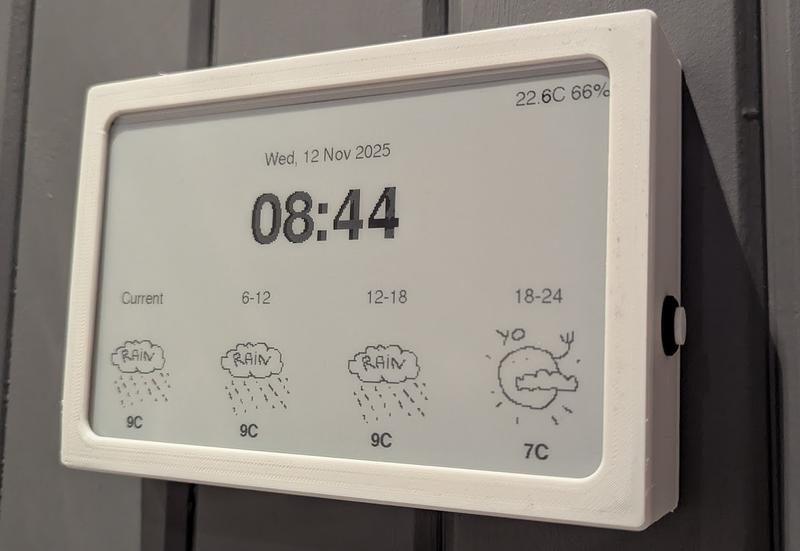
Here is my ~75euros ESP32 eink panel experiment: https://github.com/riston/eink-assist-screen/tree/main
The typical e-ink uses cases boil down to e-readers, dumb-phones, and hobbyists, which is not a huge market. Anything niche or specialized tends to carry a higher cost.
https://github.com/speedyg0nz/MagInkCal
A 12.48 Waveshare eink display costs $175. Sadly haven't gotten it to work with the Raspi Zero and therefore can't use it battery-powered. Got an ugly cord right now. Running power to the right place through the walls is definitely dedication!
https://github.com/benjajaja/kindle-bueno
However, I would now go for some ~100€ e-ink that is built for hacking.
Love the artistry and dedication in this effort - getting something just right for your own tastes and honing it over time can be really fulfilling.
For example the washing machine. You dont need real time information because you know how long it takes since you've done it 1000s of times and it beeps. All these things are just managed in our heads subconsciously.
It beeps, on the other end of the house (or on another floor), where it's inaudible. (And, thankfully, where the loud sounds of it operating are also inaudible.)
> All these things are just managed in our heads subconsciously.
And when you remove the need to track that in your head, your head gets freed up for other things.
To be explicit, I don't like "smart appliances" that connect to a cloud server. I do like the idea of devices that can connect locally to something like Home Assistant.
Though, $2000 is a step price.
I had some fun with using an Inkplate e-ink display - bough a bare 5" for €74 (a 10" with batteries is there €219). Smaller, but also way more affordable.
It connects via WiFi, and make it display random, vide https://github.com/SolderedElectronics/Inkplate-Arduino-libr....
We use a WhatsApp channel for our family to manage breakfast meetups and who needs what from the shops or the pharmacy (they are on our healthcare plan) and general conversation about events or troubles and parental advice in their lives.
One kid live on her own with her bf a few minutes from us but she can't drive so we sometimes have to pick her up from work.
It gets muddled but works for us as the rule is no pet photos unless it is very cute (cat with a dustbin cover on his head) or inspirational daily quotes.
Where I got stuck is calendars... Unfortunately Google Calendar doesn't seem to provide a nice API where you can just say "give me the events for these days", instead you can only download all of your events in iCal format. It's then extremely non-trivial to convert that information into "what is happening today".
Something like:
```
function doGet(req) {
  let start = new Date();

  start.setHours(12,0,0,0);

  let end = new Date(start);

  end.setDate(end.getDate() + 3);

  let events = CalendarApp.getEvents(start, end);

  return ContentService.createTextOutput(events.map(x => x.getTitle()));
```