sure hope nobody does that targeting ips (like that blacklist in masscan) that will auto report you to your isp/ans/whatever for your abusive traffic. Repeatedly.
Seems to me that the problem is the NAS's web interface using sentry for logging/monitoring, and part of what was logged were internal hostnames (which might be named in a way that has sensitive info, e.g, the corp-and-other-corp-merger example they gave. So it wouldn't matter that it's inaccessible in a private network, the name itself is sensitive information.).
In that case, I would personally replace the operating system of the NAS with one that is free/open source that I trust and does not phone home. I suppose some form of adblocking ala PiHole or some other DNS configuration that blocks sentry calls would work too, but I would just go with using an operating system I trust.
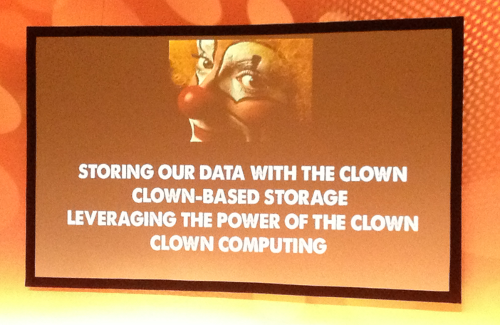
Clown is Rachel's word for (Big Tech's) cloud.
was (and she worked at Google too)
> "clowntown" and "clowny" are words you see there.
Didn't know this, interesting!
The term has been in use for quite some time; It is voicing sarcastic discontent with the hyperscaler platforms _and_ their users (the idea being that the platform is "someone else's computer" or - more up to date - "a landlord for your data"). I'm not sure if she coined it, but if she did then good on her!
Not everyone believes using "the cloud" is a good idea, and for those of us who have run their own infrastructure "on-premises" or co-located, the clown is considered suitably patronising. Just saying ;)
I have a vague memory of once having a userscript or browser extension that replaced every instance of the word "cloud" with "other peoples' computers". (iirc while funny, it was not practical, and I removed it).
fwiw I agree and I do not believe using "the cloud" for everything is a good idea either, I've just never heard of the word "clown" being used in this way before now.
Using LE to apply SSL to services? Complicated. Non standard paths, custom distro, everything hidden (you can’t figure out where to place the ssl cert of how to restart the service, etc). Of course you will figure it out if you spent 50 hours… but why?
Don’t get me started with the old rsync version, lack of midnight commander and/or other utils.
I should have gone with something that runs proper Linux or BSD.
That said, I’ll probably try out the UniFi NAS offerings in the near future. I believe Synology has semi-walked-back its draconian hard drive policy but I don’t trust them to not try that again later. And because I only use my Synology as a NAS I can switch to something else relatively easily, as long as I can mount it on my app server, I’m golden.
There are guides on how to mainline Synology NAS's to run up-to-date debian on them: https://forum.doozan.com/list.php
If you have OPNSense, it has an ACME plugin with Synology action. I use that to automatically renew and push a cert to the NAS.
That said, since I like to tinker, Synology feels a bit restricted, indeed. Although there is some value in a stable core system (like these immutable distros from Fedora Atomic).
leave it to serve files and iscsi. it's very good at it
if you leave it alone, no extra software, it will basically be completely stable. it's really impressive
Public services see one way (no TCP return flow possible) from almost any source IP. If you can tie that from other corroborated data, the same: you see packets from "inside" all the time.
Darknet collection during final /8 run-down captured audio in UDP.
Firewalls? ACLs? Pah. Humbug.
Mind elaborating on this? SIP traffic from which year?
Internal hostnames leaking is real, but in practice it’s just one tiny slice of a much larger problem: names and metadata leak everywhere - logs, traces, code, monitoring tools etc etc.
I think a lot of people underestimate how easy a "NAS" can be made if you take a standard PC, install some form of desktop Linux, and hit "share" on a folder. Something like TrueNAS or one of its forks may also be an option if you're into that kind of stuff.
If you want the fancy docker management web UI stuff with as little maintenance as possible, you may still be in the NAS market, but for a lot of people NAS just means "a big hard drive all of my devices can access". From what I can tell the best middle point between "what the box from the store offers" and "how do build one yourself" is a (paid-for) NAS OS like HexOS where analytics, tracking, and data sales are not used to cover for race-to-the-bottom pricing.
All you really need is a bunch of disk and an operating system with an ssh server. Even the likes of samba and nfs aren't even useful anymore.
There's a theoretical risk of MitM attacks for devices reachable over self-signed certificates, but if someone breaks into my (W)LAN, I'm going to assume I'm screwed anyway.
I've used split-horizon DNS for a couple of years but it kept breaking in annoying ways. My current setup (involving the pihole web UI because I was sick of maintaining BIND files) still breaks DNSSEC for my domain and I try to avoid it when I can.
Whereas Synology or other NAS manufacturers can tell me these numbers exactly and people have reviewed the hardware and tested it.
You never could. A host name or a domain is bound to leave your box, it's meant to. It takes sending an email with a local email client.
(Not saying, the NAS leak still sucks)
I've received many emails from `root@localhost` over the years.
Admittedly, most residential ISPs block all SMTP traffic, and other email servers are likely to drop it or mark it as spam, but there's no strict requirement for auth.
Source? I've never seen that. Nobody could use their email provider of choice if that was the case.
Another thing usually sending mails is cron, but that should only go to the admin(s).
Some services might also display the host name somewhere in their UI.
I agree the web UI should never be monitored using sentry. I can see why they would want it, but at the very least should be opt in.
also
> you notice that you've started getting requests coming to your server on the "outside world" with that same hostname.
Scanning wildcards for well-known subdomains seems both quite specific and rather costly for unclear benefits.
> You're able to see this because you set up a wildcard DNS entry for the whole ".nothing-special.whatever.example.com" space pointing at a machine you control just in case something leaks. And, well, something did* leak.
They don't need the IP address itself, it sounds like they're not even connecting to the same host.
You now have to argue that a random third party is using and therefore paying sentry.io to do monitoring of random subdomains for the dubious benefit of knowing that the domain exists even though they are paying for something that is way more expensive.
It's far more likely that the NAS vendor integrated sentry.io into the web interface and sentry.io is simply trying to communicate with monitoring endpoints that are part of said integration.
From the perspective of the NAS vendor, the benefits of analytics are obvious. Since there is no central NAS server where all the logs are gathered, they would have to ask users to send the error logs manually which is unreliable. Instead of waiting for users to report errors, the NAS vendor decided to be proactive and send error logs to a central service.
So, no one competent is going to do this, domains are not encrypted by HTTPS, any sensitive info is pushed to the URL Path.
I think being controlling of domain names is a sign of a good sysadmin, it's also a bit schizophrenic, but you gotta be a little schizophrenic to be the type of sysadmin that never gets hacked.
That said, domains not leaking is one of those "clean sheet" features that you go for no reason at all, and it feels nice, but if you don't get it, it's not consequential at all. It's like driving at exactly 50mph, like having a green streak on github. You are never going to rely on that secrecy if only because some ISP might see that, but it's 100% achievable that no one will start pinging your internal host and start polluting your hosts (if you do domain name filtering).
So what I'm saying is, I appreciate this type of effort, but it's a bit dramatic. Definitely uninstall whatever junk leaked your domain though, but it's really nothing.
This too is not ideal. It gets saved in the browser history, and if the url is sent by message (email or IM), the provider may visit it.
> Definitely uninstall whatever junk leaked your domain though, but it's really nothing.
We are used to the tracking being everywhere but it is scandalous and should be considered as such. Not the subdomain leak part, that's just how Rachel noticed, but the non advertised tracking from an appliance chosen to be connected privately.
Sure. POST for extra security.
> Not the subdomain leak part, that's just how Rachel noticed, but the non advertised tracking from an appliance chosen to be connected privately.
If this were a completely local product, like say a USB stick. Sure. but this is a Network Attached Storage product, and the user explicitly chose to use network functions (domains, http), it's not the same category of issue.
Btw, in this case it can’t be paranoia since the belief was not irrational - the author was being watched.
>Btw, in this case it can’t be paranoia since the belief was not irrational - the author was being watched.
Yes, but I mean being overly cautious in the threat model. For example, birds may be watching through my window, it's true and I might catch a bird watching my house, but it's paranoid in the sense that it's too tight of a threat model.
What about all the people who are incompetant?
If Firefox also leaks this, I wonder if this is something mass-surveillance related.
(Judging from the down votes I misunderstood something)
This helps you (=NAS developer) to centralize logs and trace a request through all your application layers (client->server->db and back), so you can identify performance bottlenecks and measure usage patterns.
This is what you can find behind the 'anonymized diagnostics' and 'telemetry' settings you are asked to enable/consent.
For a WebUI it is implemented via javascript, which runs on the client's machine and hooks into the clicks, API calls and page content. It then sends statistics and logs back to, in this case, sentry.io. Your browser just sees javascript, so don't blame them. Privacy Badger might block it.
It is as nefarious as the developer of the application wants to use it. Normally you would use it to centralize logging, find performance issues, and get a basic idea on what features users actually use, so you can debug more easily. But you can also use it to track users. And don't forget, sentry.io is a cloud solution. If you post it on machines outside your control, expect it to be public. Sentry has a self-hosted solution, btw.
My current solution is a massive hack that breaks down every now and then.
and why is plex not in it's own VLAN with a egress FW rules to second with?
lastly, why aren't you running snort/suricata to inspect the packets originating at plex?
let me solve this problem for you - it probably doesn't bother you at all.
otherwise, you'd scratched your itch a long time ago.
> Clueless lol.
It's ok to be clueless. And, it's ok to be working for a FAANG and be clueless too.
Glad you're not being too hard on yourself :)
if you want hardcore - segment the VLAN, egress FW, put your stoopid LAN devices on their separate VLANs, cordone off using gateway FW, DPI the packets, nullroute/blackhole DNS the shit out of trackers/analytics
Show some humility.
What's more, one doesn't really read Rachel for her potential technical solutions but because one likes her story telling.
> Around this time, you realize that the web interface for this thing has some stuff that phones home, and part of what it does is to send stack traces back to sentry.io. Yep, your browser is calling back to them, and it's telling them the hostname you use for your internal storage box. Then for some reason, they're making a TLS connection back to it, but they don't ever request anything. Curious, right?
Unless you actively block all potential trackers (good luck with that one lol), you're not going to prevent leaks if the web UI contains code that actively submits details like hostnames over an encrypted channel.
I suppose it's a good thing you only wasted 30 seconds on this.
LetsEncrypt doesn't make a difference at all.
The reason for this distinction is that failing to meet a Requirement for issued certificates would mean the trust stores might remove your CA, but several CAs today do issue unlogged certificates - and if you wanted to use those on a web server you would need to go log them and staple the proofs to your certs in the server configuration.
Most of the rules (the "Baseline Requirements" or BRs) are requirements and must be followed for all issued certificates, but the rule about logging deliberately doesn't work that way. The BRs do require that a CA can show us - if asked - everything about the certificates they issued, and these days for most CAs that's easiest accomplished by just providing links to the logs e.g. via crt.sh -- but that requirement could also be fulfilled by handing over a PDF or an Excel sheet or something.
FWIW - it’s made of people
You meant you shouldn't right? Partially exactly for the reasons you stated later in the same sentence.
CA/B Forum policy requires every CA to publish every issued certificate in the CT logs.
So if you want a TLS certificate that's trusted by browsers, the domain name has to be published to the world, and it doesn't matter where you got your certificate, you are going to start getting requests from automated vulnerability scanners looking to exploit poorly configured or un-updated software.
Wildcards are used to work around this, since what gets published is *.example.com instead of nas.example.com, super-secret-docs.example.com, etc — but as this article shows, there are other ways that your domain name can leak.
So yes, you should use Let's Encrypt, since paying for a cert from some other CA does nothing useful.
I am not entirely aware what LE does differently, but we had very clear observation in the past about it.
I'd link you to one of the articles if I wasn't blocked too, and my VPN wasn't also blocked!