406 pointsby celsoazevedo18 days ago49 comments
  • breput18 days ago
    I was a 10+ year long Nova Launcher user and knew this day was coming after the sale and layoffs[0][1]...

    This evening I at looked several replacement launchers, such as Lawnchair and even the stock Pixel launcher again, but Octopi Launcher[2] is the more modern, more refined Nova replacement that you are looking for.

    It was a very easy, natural transition process from Nova - all of the Nova features that I used were there (unlike Lawnchair), such as swipe up/down on icons to perform different actions. And little things like folder options, icon placement, and widget handling are SO much nicer on Octopi compared to Nova. Staggeringly better.

    I took a screenshot of each home screen page, set Octopi as the new default launcher, and was back to my previous configuration but with a significantly improved visual appearance, in about 15 minutes. It's a no-brainer upgrade from Nova.

    The Google Play install is free and basically unlimited, but there is an unobtrusive "Buy Me A Coffee" type button that allows you to donate either $1 or $3 to unlock some eye candy, which I did, but mostly just wanting to support the developer.

    [0] https://news.ycombinator.com/item?id=45170000

    [1] https://www.androidpolice.com/exclusive-cliff-wade-nova-laun...

    [2] https://play.google.com/store/apps/details?id=com.otp.octopi...

    • ssl-318 days ago
      Thanks for the tip.

      I opened up my phone to see about giving Octopi a shot, and (amusingly? alarmingly?) Nova Launcher produced a popup warning me that it would now feature ads.

      Anyway, my launcher needs are pretty minimal. Switching over and recreating a familiar layout was easy enough.

      I do find one function missing, though: Some shortcut functionality seems missing in Octopi that was present in Nova.

      For instance: Shazam. I use it to identify the music I hear, and that's all I want it for. With Nova, I was able to create a single-tap button on the home screen for a "Shazam Now" shortcut that immediately went straight to the identification phase with zero nonsense. This worked slick, and I'd been using it this way for a decade or so.

      With Octopi, I can long-press the Shazam icon and pick "Shazam Now", and that does work. But that's multiple steps instead of just one, and I can't drag that shortcut to the home screen. There is also a list of apps with shortcuts that I can add, but Shazam is missing from that list.

      Thus, the single-tap Shazam Now function I'm familiar with is presently lacking. Perhaps some day. :)

      (Otherwise, Octopi fits with everything else I want to do, so I'm buying the dev a coffee.)

      • hnuser12345618 days ago
        You can use the open source app Activity Launcher to create homescreen shortcuts to directly launch any exposed activity/method in any app. There's probably a StartSongSearch or similar activity in Shazam. (there's also a song search activity in the Google app)

        https://github.com/butzist/ActivityLauncher

      • BoppreH18 days ago
        I managed to add a Shazam Now button using a Shazam widget, not a shortcut. Give it a try!

        I just installed Octopi on this thread's recommendation. Pretty good so far, and I'm happy to remove the useless Google search bar from the bottom of my Pixel (I use Kagi and Firefox, neither of which can be configured on that bar). Also satisfied how you can resize widgets to any size, regardless of what the widget asks for.

        • ssl-318 days ago
          That's similar functionality, but it's not a Shazam Now shortcut. I really don't want any widgets -- at all, ever. And I need labels -- remembering arbitrary iconography is a silly task when phonetic written language exists.

          Just a shortcut is fine. Or at least: It had been fine for nearly a decade.

          This, right here: This is what I want, and what I was using with Nova Launcher until late last night. https://www.androidpolice.com/2017/01/27/shazam-gets-updated...

          :)

          (Besides, Shazam is just a singular example. I had other shortcuts that I also used. I'm really rather disinterested in finding individual workarounds for each of them.)

          • ssl-317 days ago
            As an unfortunate reply to myself, I'd like to ask a question to nobody in particular: Do y'all not use shortcuts? I think that they are pretty neat, and we've had them on Android since around version 7.1.

            And the reason I ask this is because when I Google up different combinations of nouns, verbs and word usements for my problem of Android shortcuts and Octipi Launcher, I fairly-consistently find my own recent comments on HN (above, in these threads; within the bounds of this posting) in the top 5 results.

            And that tells me that I am not only preaching to the choir, but the choir only exists of one member. And that member is me.

            So I guess I am thus preaching to myself.

            Awesome!

            And thus, perhaps I am much more of an outlier than I ever imagined.

            So the question stands: Am I really looking in from the outside with my quest for Android shortcuts that we've had for almost a decade? Is this lack of functionality really a thing that others just simply don't notice in a modern Android ecosphere? Is it a forgotten relic of the past?

            (Whatever the case, it presently doesn't work with Octopi Launcher -- and I'm going to keep using it anyway.)

            • BoppreH15 days ago
              A bit late, but maybe you'll see this reply.

              I do use shortcuts, even with Octopi. WhatsApp has shortcuts to chat with specific contacts, and Termux has shortcuts to arbitrary snippets, and I love both. I mentioned the Shazam widget only because it seemed to have the exact same functionality, only lacking the label.

              • ssl-315 days ago
                It's not the same, though.

                A widget is a thing that runs. It's an active process with a channel to create its own on-screen display, and the mere existence of it consumes non-zero CPU even if never invoked.

                A shortcut is more like an icon on a Windows desktop, or perhaps a unix symlink. If it is never used, then it never really does anything at all.

                Anyhow, Octopi. It does support shortcuts, but it seems like there's two different pathways for them and they do not work the same at all.

                One pathway: Long-press the wallpaper and there's a list of them a tap or two away for some apps and it's easy to add them to the home screen. Home Assistant is in this list, but Shazam is not.

                The other pathway: Long-press an app icon and a list of named shortcuts may appear. These are impossible to link to a home screen icon. And the per-app behavior is opposite: Long-pressing Home Assistant does not present this list, while long-pressing Shazam does.

      • pepa6518 days ago
        I tried with Round Sync to add a button for a certain task to my home screen, and it doesn't work... That is very sad, it used to work on Nova.
    • princevegeta8918 days ago
      What a coincidence of shitholery here. I've been a very loyal user of Nova for almost a decade now, and I have never even thought of using any other launcher. Now, strangely since 2 weeks ago, on my Samsung phone, I've been experiencing a lot of freezing and random crapping out of my Nova launcher, where it would just not let me do anything and show a blank home screen with a wallpaper. So this most likely is the reason, I'm not sure, but this sends a very bad vibe down the line now.

      I am going to look for a nice open source launcher and get used to it. To hell with the shittification of our beloved apps and services.

      • rpdillon18 days ago
        I've been using the keyboard based KISS launcher for 6 years now. Available in F-Droid, small, light, fast.
        • princevegeta8918 days ago
          I just tried kvaesitso and it seems good so far. Will try KISS once thanks
    • amne18 days ago
      that same moment I switched to Niagara launcher. After 10 minutes of using it bought the Pro level and that was it. I kept around 5 apps in main screen, YT music widget automatically pops up on top when I connect headphones. The side scroll is very well thought out. For each letter the most used apps are on top. This one clicked with me.
      • subscribed18 days ago
        I tried Niagara myself, but that's not for me. I need more than one widget, very different weather widget, and quick access to the full drawer.

        Separately it openly states in the privacy policy it states your location with third parties (or at least did 2 months ago). Big GTFO from me at this point.

        I also tried and loved Kvaesito, but sadly their strict "one widget per line" limitation is where I bailed out. I use a number of 1x1 and 1x2 widgets so this basically breaks it down for me.

        Looking forward for the Nova replacement :(

    • nxtbl18 days ago
      "In-app purchases" another annoyance of the play store, can't see prices without installing an app. So question for users of Octopi, how's the pricing?
      • ffsm818 days ago
        1. It's not unique to the play store, as a matter of fact, this started in the iOS app store and was "adopted" by Google. It could definitely be improved though, i.e. if all potential in-app purchases were listable via the store page, like on steam for example

        2. The prices were mentioned in the comment you're responding to.

        • noja18 days ago
          > this started in the iOS app store and was "adopted" by Google

          I can see prices for in-app purchases in the iOS App Store.

          • ffsm818 days ago
            Where? Just checked on every app I've purchased in app unlocks and none of them have any indicator for these unlocks (or others that are still available) on their app store page.

            The only way to see them - from my experience which I just verified - is to go into the app and go into the relevant menu's of the apps.

            Please explain where you're able to see this information on the app store on iOS or iPadOS

            • gruez18 days ago
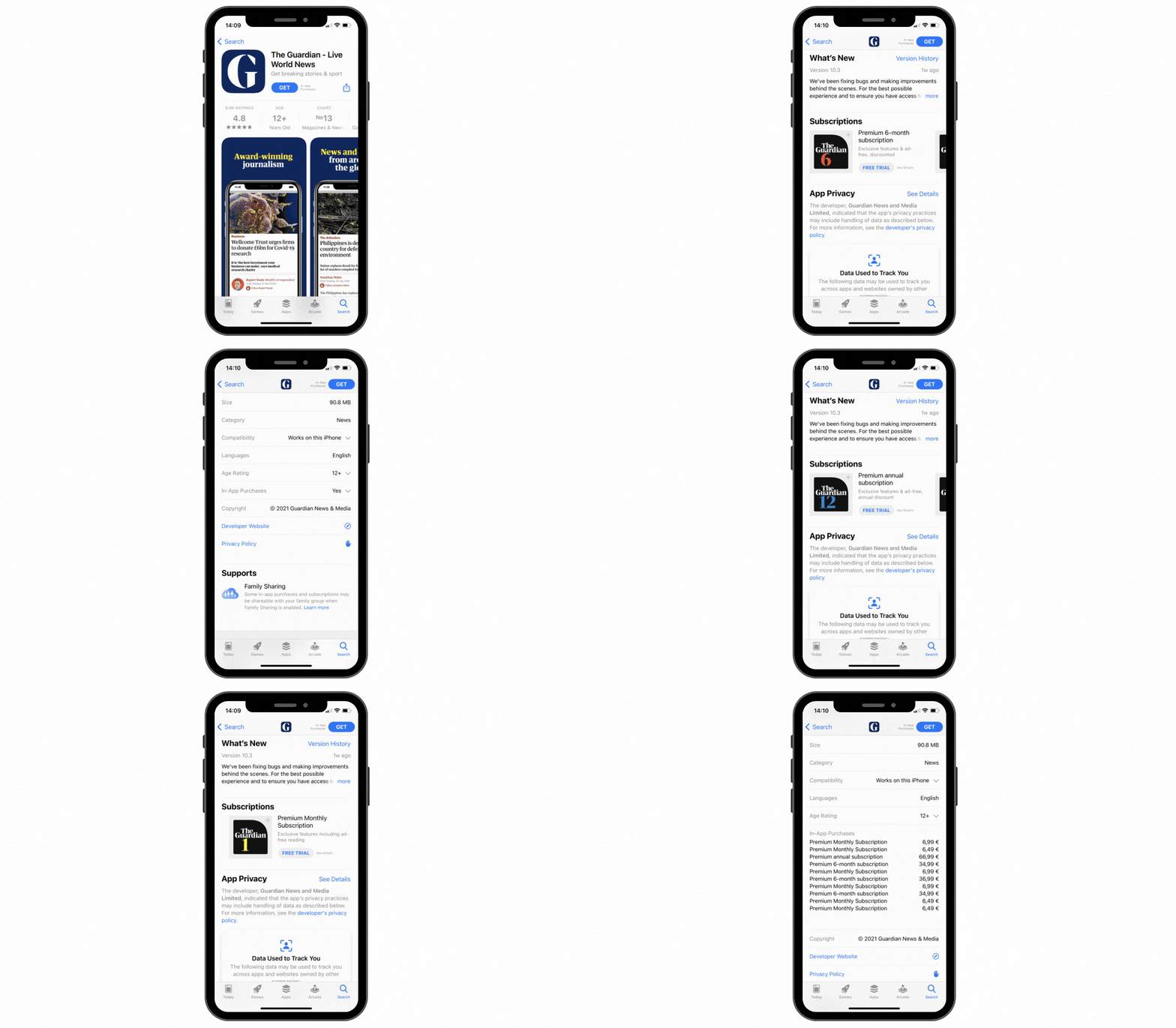
              It's in the app store's app listing, just under age rating. It says "in app purchases: yes", which you can expand to show all purchase options.

              https://back.ww-cdn.com/superstatic/docs-res/41269/in-appfin...

              • ffsm818 days ago
                Is this maybe only available for some regions or opt-in for the developer? I this UX doesn't exist on my devices running on 26.2 in the apps I checked. I just verified again but no luck

                /Edit: found it! that is way too hidden - Would never have found that without your explicit mention and gif link!

                After exploring some more on the play store too, There is actually a similar UI in the app details there too, it doesn't list all items but the price range (cheapest item to most expensive item). Definitely worse then having all items listed, but both could be improved imo by listing them as repeatable purchases, temporary licenses, forever unlocked etc) for informed consent before install. I'd never install any app which has repeatable transactions for example

    • ezst18 days ago
      What seems to be missing from every alternative I've seen is the power offered by the combo Nova+Sesame. I really don't use my launcher as a navigation system. All it does for me is pop open a search box after a swipe so I can type the name of the app I want to use, the contact I want to text or call, etc.

      There seem to be other "search-first" launchers out there (KISS is one), but then they miss the amount of expected polish (unread/notification badges, leeway in letting you place random widgets on the background, etc). Still searching.

      • high_priest16 days ago
        I use the Nova Launcher in exact same way as you. I've checked many alternatives and none are as polished as Nova.
    • cik18 days ago
      As another 10+ year Nova Launcher user, I appreciate this. I bought prime forever ago (3x actually as I moved domains), I'll happily use Octopi on my tablet. Thanks again!
    • Wurdan18 days ago
      I've spent about 10 mins seeing if I can replicate my Nova setup with Octopi. My only missing feature so far is more extensive gesture support. As far as I can tell, Octopi supports a max of five actions, and you can't change the gestures for them. They seem to be hardcoded to "swipe up", "swipe down", "swipe right from first screen", "double tap" and "tap home (icon)". If I could change the gesture for "swipe right from first screen" and "double tap" then I could almost perfectly recreate my Nova setup.
    • saltcured18 days ago
      It's these discussions where I realize people use phones in such different ways.

      I abandoned Nova last year when I read about this looming problem. I found that Fossify Launcher beta (from F-Droid) works well enough for me on my Pixel 8a.

      I don't really need much out of a launcher. My main goal was to have one like my older Android and not be forced to have a search bar or assistant triggers on my home screen.

      All I need from the home screen is to be able to place basic widgets like clock and calendar and shortcuts for the basic apps I use frequently. A plain app drawer is fine for the rest, because I don't really install that many apps and instead disable/remove many. My app drawer shows 35 apps and has several blank rows remaining on the first page with 5 icons per row.

    • Semaphor18 days ago
      I liked it, but when I added a 4x1 widget (meteoblue forecast), that didn’t properly resize to the size available. Wasn’t a problem for Hyperion or Nova, was worse for Lawnchair.
      • breput18 days ago
        Widget sizing/appearance was probably the only surprise that I discovered between Nova and Octo. Resizing in Octo takes a bit of getting used to, but I was able to reproduce the appearance of all of my widgets.

        Padding is a little different and harder to discover than Nova - it is in the "Customize appearance" menu when you long tap on a widget. That is something to check out, as well as making sure Rounded Corners aren't enabled.

        There is also a "Freely position and resize items" option in the Launcher Settings->Home tab, which I do not have enabled, but might be necessary to get your widget sizing just right?

        • Semaphor18 days ago
          Yeah, tried all of that, but none of the options work. Funnily enough with free resizing it looks right for a moment, then changes to being too big again.

          I’ll certainly not exclude this being a meteoblue issue (I only use two widgets, digical and meteoblue), but Hyperion (only with 6 columns) and Nova (always) get it right.

          • breput18 days ago
            I had never experienced meteoblue so I installed it, it looked very nice, but when I added the 4x1 widget, it looked horrible. I resized it and got "Subscription required. Tap on the widget to open the in-app store"!

            If you're in the US, I like NOAA Weather Unofficial[0]. It is not quite as visually impressive as meteoblue, but has good technical details and the 4x2 widget resized exactly like I wanted. I think the free version is unrestricted, but it is another app where I explicitly wanted to support the developer.

            [0] https://play.google.com/store/apps/details?id=com.nstudio.we...

            • Semaphor18 days ago
              Ah yeah, it’s paid. I’m in Germany.
    • aagha17 days ago
      Thank for the list.

      I tried some of these and decided on Smart Launcher [0] espescially because they had an "import settings from Nova" feature. AND their search is amazing--with a single search it looks at contacts, web search, apps, etc.

      0 - https://www.smartlauncher.net/

    • InfinityByTen18 days ago
      Thank you for this! I was really happy with one launcher that I configured probably 8-9 years ago and then moving to the new phone meant everything just worked (^tm ?) with normal phone porting. Reading the headline made me freak out for 2 min. I really really do not like UI muscle memory being changed for something like my phone.
    • SeriousM17 days ago
      Octopi es an excellent replcement. Thnaks for your recommendation.
    • gbil18 days ago
      What is your experience from a performance perspective? Nova Launcher was pretty light on that front, I'm using smart launcher since a few months and it is ok but Nova was lighter.
      • breput18 days ago
        I only have one day's worth of light usage on a Pixel 9 Pro, but it feels at least as responsive as Nova Launcher.

        Zero lag in switching screens, opening the app drawer, or scrolling through apps - there is a control for the animation speed, but it doesn't seem to really have any impact, positive or negative.

    • opan18 days ago
      I use OpenLauncher from F-Droid and have been pretty happy with it.
    • AdmiralAsshat18 days ago
      Meh. I installed Octopi, but it's like death by a thousand cuts. The dock looks like hot garbage when you flip to landscape mode--it ends up taking up like 60% of the screen. I don't know why it doesn't just switch to vertical mode the way Nova did.

      Lack of being able to name the folders is also an annoyance, as is the way the folder icons pop out to the side from the dock rather than up-and-over.

      • gf00018 days ago
        You can rename folders. Long press on them, edit and you have quite a few options.
  • celsoazevedo18 days ago
    For those still using Nova Launcher (custom launcher for Android), it seems that it's owned by a new company and the latest update comes with the Facebook Ads and Google AdMob SDKs and require extra permissions.

    8.1.6:

    - Branch (analytics)

    - Bugsnag (crash report)

    8.2.4:

    - Facebook Ads (advertisement)

    - Google AdMob (advertisement)

    - Branch (analytics)

    - Bugsnag (crash reporting)

    - Google CrashLytics (crash reporting)

    - Google Firebase Analytics (analytics)

    • fireflash3818 days ago
      Any good alternatives people are using? I've used Nova for absolutely ages
      • kenrick9518 days ago
        I switched to KISS Launcher several years back and had been loving it. I like the philosophy of search-based launcher. This way, if I don't actively search for an app, I won't be distracted into opening one
        • yummybrainz18 days ago
          KISS launcher is excellent. I've been using it for years now and would never go back to any other style of launcher.

          The only improvement I could imagine is supporting multiple screens of widgets (i.e. swiping left/right or scrolling up/down).

          For folks interested in checking it out:

          Website: https://kisslauncher.com/ Source: https://github.com/Neamar/KISS Store: https://f-droid.org/packages/fr.neamar.kiss/

        • AlbinoDrought18 days ago
          I did this as well when the previous Nova launcher news came out. It took maybe a day to get used to, but I like it much more now - I have nothing to organize, I just access what I want to use instead. It feels natural.
        • t0bia_s18 days ago
          KISS launcher user for about 5 years and never looking back. Search line for everything is actually faster then browsing list of icons.
        • rpdillon18 days ago
          Yep, I was doing a lot of launcher hopping back in the day, but ever since I moved to KISS, I haven't felt the need. It brings a level of intentionality by forcing you to search for the app you want to use. For my most commonly usef apps, binding them to swipe gestures makes using the phone very fast and easy.
        • dugite-code18 days ago
          I always find myself missing widgets with KISS.

          But then when I use a launcher like lawnchair with widgets I rarely end up actually using them. Wish there was something like widget drawer that was FOSS tbh

          • rpdillon18 days ago
            KISS supports widgets though. Tap the right side of the input box in the launcher to open settings, and the third item down on the menu is "add widget".
        • DanOpcode18 days ago
          I made the switch to KISS some time ago. Really like it! I haven't missed anything. Simple and does the job. No distractions.
      • BLKNSLVR18 days ago
        I moved to Lawnchair when I recently-ish migrated to GrapheneOS. I can't remember why I didn't go with Nova Launcher again, might have been related to the permissions required.

        Lawnchair has fewer options, ie. is simpler, but I haven't, in practice, noticed any memorable differences.

        • murrayb18 days ago
          I just switched to Lawnchair thanks for the recommendation. Seems to do everything I wanted from Nova anyway.
      • flax18 days ago
        I've been mostly happy with Action launcher. It has the few features I really liked from Nova that are missing from pixel launcher: I can make my home screens scroll in a circular/infinite manner, I can remove the search bar and the google news feed or whatever they call the left page, I can set more than one page in the dock.

        Unfortunately, the app list page isn't quite as configurable. There are folders rather than tabs, and there's an extra click necessary to search by app name. Overall, it does the job.

      • Aluminum064318 days ago
        • breput18 days ago
          Thank you! I had looked at several recommended launchers and none were real Nova Launcher replacements. I randomly saw your comment and was intrigued, especially since I hadn't seen a lot of sources mentioning Octopi Launcher as a suitable option.

          It is the perfect Nova Launcher replacement. The UI and features feels like a more polished Nova and transitioning to Octopi is such an intuitive process.

        • raybb18 days ago
          Do you know if this, or any other launcher for that matter, works well on the latest Android for Pixels? Ever dang launcher I try (Nova included) has this horrible problem where at some point during the day the app launcher becomes a wasteland of blanked out apps with no names and no order. Only fix is to restart the phone. It got a little better with Android 16 but not much.
          • JoshTriplett18 days ago
            I use Octopi on the Pixel 9 Pro Fold. Works great, rock solid, zero issues.
            • Aluminum064318 days ago
              Also using it on the Pixel 9 Pro Fold, running GrapheneOS. It's also working perfectly for me!
              • JoshTriplett18 days ago
                That's exactly the phone I'm using it on.
          • ilioscio16 days ago
            It's working well here on a pixel 9 pro
      • sgc18 days ago
        I switched from Nova to Smart Launcher a couple years ago because it allowed me better customization of app groups - although I did need to work on the config a bit. I like it.
      • canthonytucci18 days ago
        Lawnchair is not as fancy but it works
        • ahartmetz18 days ago
          People are suggesting mostly search-based launchers here. Lawnchair is a launcher similar to Nova (icon-based) which should be safer from enshittification because it's FOSS. Actually derived from an old Google Launcher...

          Yes, Lawnchair isn't packed with functionality, but it's also not packed with anti-functionality.

          • ahartmetz18 days ago
            Background: I have just switched from Nova, for which I paid (Nova Prime), to Lawnchair, initially as a trial. But I'll probably stick with it.
        • Fire-Dragon-DoL18 days ago
          It doesn't support adding pages to the home,sadly
          • spiffytech18 days ago
            I get the error if I try dragging the icon to the home screen. But it works if I click "add to home screen" so it auto-places, then move the icon afterward.

            I've got a bunch of web pages on my Lawnchair home screen.

          • notpushkin18 days ago
            Did you mean tabs (to the drawer)? You totally can add new pages to the home – try moving an icon beyond the screen border.
            • Fire-Dragon-DoL18 days ago
              No I mean that if in Brave I say "add this page to the home", the launcher gives an error
              • notpushkin18 days ago
                Ah, pages like in webpages. Gotcha.

                It’s interesting, Lawnchair works totally fine with these “app action” 1×1 widgets, and Firefox can add website shortcuts without any problem for me. I’ll try it in Brave a bit later.

              • GlitchRider4718 days ago
                That's strange, that hasn't happened to me. Maybe a reinstall might fix the problem? I use it on a Pixel 8A
                • Fire-Dragon-DoL18 days ago
                  Uh interesting. I'm on Pixel 8A too. Could be! I'll give it another shot
        • garciansmith18 days ago
          Lawnchair is good. I just really want app drawer tabs, the only reason I've stuck with Nova.
      • flexagoon18 days ago
        Kvaesito is a great search-focused FOSS launcher
        • lawn18 days ago
          This is also what I migrated to a while back.

          It's quite different compared to Nova and other launchers but after using it a while I've come to love it. Do yourself a favor and give it a few days before you dismiss it.

      • planetafro18 days ago
        I use Niagra. So good once you get used to it.
        • cromka18 days ago
          3. Types of Data collected Among the types of Personal Data that this Application collects, by itself or through the listed Data Processors, there are:

          Unique device identifiers Approximate geographic position (city level) IDs (package names) from installed apps Usage Data Cookies

          Oh boy...

          • GlitchRider4718 days ago
            Yeah.. I used to use Niagra because it really is a great launcher but I don't like the data collection. A great FOSS alternative is Kvaesitso which doesn't have the exact same layout but it is search based. They also managed to implement a native search that in my opinion is better than Sesame.
      • Krutonium18 days ago
        I'm using Evie Launcher, but a really old version from just before the developer shut down the project and later removed it from the store. If you look today, you'll find a fairly convincing imposter that loves spamming you with ads, from a different developer.

        The APK is at least 6 years old now.

      • spondyl18 days ago
        As a relatively new convert back to Android, I've been using Niagra Launcher and enjoying it.
      • dcreater18 days ago
        Its ok to just stay on v7 no? Thats what im doing.
      • cons0le18 days ago
        Here's the most stripped down launcher in the world:

        https://github.com/fandreuz/TUI-ConsoleLauncher

        I don't need icons, swiping, widgets, or any of that nonsense. This one works great and you can ssh, use tmux right from the launcher

      • Erenay0918 days ago
        I am using "Minimo Launcher". I have an OLED display. So its using less battery. Also it's open source.

        https://github.com/VaibhavLakhera/minimo-launcher

      • dcl18 days ago
        How much am I missing out by using the standard launcher my Pixel comes with? I haven't played with different launchers since the Nexus 4 and Android 2/3 (I think).
        • toast018 days ago
          I don't like the stock launcher because I can't remove the search bar and I never use the search bar. Nova feels like a no nonsense launcher that does what I need. I think last time it came up, the recommended option was missing something for me so I stayed with Nova, but the writing is on the wall.

          Checked again and I don't see a way to get a button to show the app drawer on Lawnchair, and I don't want to use a gesture, so that's going to be hard to use.

          • array_key_first18 days ago
            I switched to Nova for the same reason. I paid for it, too. I pay and donate for good software all the time, but this is another sober reminder to never pay for proprietary software.
          • kristopolous18 days ago
            Most of these other launchers seem to force a fucking search bar on you.

            It's distracting and I don't want it

            Is there a way to just pin an app to a version? Then Nova is fine

            • stavros18 days ago
              I just tried a few launchers and none of them forced a search bar (or do you mean not on the home screen?). In fact, in Lawnchair and Octopi, I had to manually add a search bar if I wanted one.
              • JohnFen18 days ago
                Yeah, I tried out a handful of launchers too and none of them forced a search bar on me. Most of the had a search bar widget by default, but it was easy to remove.
            • ilioscio16 days ago
              Octopi doesn't force a search bar, or even a dock. It's actually nice that you can just have icons, widgets, and gestures, I'm really enjoying it.
            • sensanaty17 days ago
              If you find an APK of an older version you can just install that directly, and it won't auto-update on you.
        • Fuzzwah18 days ago
          For me the advantage of nova is increasing the density of app icons able to be displayed on the home screen and app drawer.

          I run with a 9x7 home screen grid and 8x6 app drawer.

          This allows me to have a weather widget with a large clock and an excellent calendar widget called Todo Agenda displayed while still allowing me to have all my apps accessible on one screen.

      • Abishek_Muthian18 days ago
        I haven't used an android launcher over a decade, stock LineageOS launcher works well for me i.e. to open app drawer and to click on apps.

        What do you folks use 3rd party launchers for?

        • ipcress_file18 days ago
          I've been using Nova Launcher to mimic webOS for almost 10 years. I might be slightly too resistant to change!
        • mkozlows18 days ago
          For not using the default Samsung launcher, which sucks.
          • imp0cat18 days ago
            Nowadays, even the default Samsung launcher is very customizable and usable. Obviously it's no Nova, but it's not bad.
        • opan18 days ago
          I like to use non-default apps from F-Droid so it's easier to feel at home on any new device. I do try to only get phones with LineageOS support, but it's cool how much of my usual stuff I can throw on an Amazon tablet or Fire Stick also.
        • SkiFire1318 days ago
          I've been using Nova Launcher since ~1year (after using it like 10 years ago) because Pixel Launcher didn't support double tap to sleep
          • UberFly18 days ago
            Main reason I use it too.
      • TrianguloY18 days ago
        I'm still using Lightning launcher, will continue to use it as long as I'm able to
      • anshumankmr18 days ago
        Don't update? Could run for ages I feel.
      • 18 days ago
        undefined
    • spopejoy17 days ago
      It's weird, I'm on 8.2.4 but it hasn't asked me for any new permissions. It did use mobile data last October but none this month. Is network access a permission? I only see "Phone" granted.

      It may be because my aging phone is on Android 10, I auto-migrated Nova from an even older phone. Back then app drawers were in the free version, so after the migration I can't modify them (don't care, I didn't end up using that feature).

    • AdmiralAsshat18 days ago
      And yet somehow my launcher updated automatically during the night, despite the change in ownership and new permissions needed.

      Thanks, Google.

      • prmoustache18 days ago
        One of the reason I don't use the playstore.
        • itsTyrion13 days ago
          One of the reasons I don't auto update stuff
    • bandrami18 days ago
      Does this mean I need a Facebook account to use it?
      • JohnFen18 days ago
        No, it means the app is sharing data with Facebook.
  • j1elo18 days ago
    What happened with the Open Sourcing promises?

    https://www.osnews.com/story/143297/nova-launchers-open-sour...

    • nar00118 days ago
      The original CEO who made that promise was kicked out, and the new one didn't care to follow it, supposedly in the dev's contract but not enough, since that didn't happen
    • prmoustache18 days ago
      Promises only engage those that believe in them.
  • Fej18 days ago
    Do older versions of Nova have any security flaws which preclude using them?

    I've been using this app for ages and it's been essentially feature-complete for several years. A part of me wants to switch launchers for no other reason than "it is supported and not tracking me", but it is possible for software to be finished, and I believe Nova falls into that category. If there's no meaningful vulnerabilities in it, there's really no reason for me to switch away, at least not immediately.

    • KetoManx6417 days ago
      Disable the network permission and you've got nothing to really worry about.
    • Stolpe18 days ago
      Not today, but maybe tomorrow
  • Semaphor18 days ago
    Well, that sucks. When the sale was announced, I tried several launchers, free and paid, and none of them were as good as Nova :/ Guess I’ll do another round.
    • calderwoodra18 days ago
      I've been using Niagara for a few years and I love it.
      • NSPG91118 days ago
        Niagara Launcher is like Niri among the other Linux Window Managers. It is highly unique, and yet still gets the job done, if not better.
      • Semaphor18 days ago
        Completely different style of launcher though.
        • anilakar18 days ago
          Yes, and it does exactly what a launcher should do. It is not designed to show a dozen widgets spread over five workspaces.

          Priced at 15 eurobucks (back in the day) it's the most expensive piece of Android software I have ever bought. I have felt no buyer's remorse whatsoever.

          Edit: looks like the perpetual license costs EUR 40 nowadays.

          • 0xTJ18 days ago
            I personally don't need a bunch of screens of widgets. I've got my first screen of the 17 apps I use the most, a clock/weather widget, and the app drawer button to bring up the (iconized) app list. On the second screen a have a widget for an app used to share pictures with friends.

            Launchers are personal, so Niagara works for you that's great! But for my use having everything is a single column is a nightmare.

            • _DeadFred_18 days ago
              Every item in the single column can also be a widget, shortcut, or popup folder. I have the 5 top apps I use, then a popup folder that holds 4 I use less often. It works great, and I can get to/launch everything just using the thumb holding the phone.
          • Semaphor18 days ago
            My screen is pretty simple, 5 folders with icons, 10 other icons, one calendar widget, one weather widget. It’s what a homescreeen should do for me. Because not everyone is you.
            • anilakar17 days ago
              If you look at your parents' phone, chances are that there are five or more almost empty pages with automatically added icons all over the place.
            • calderwoodra18 days ago
              Afaik, Niagra has all of that.

              My favorite aspect of it is that I can remove all text and see 95% of the wall paper at all times.

    • mkka18 days ago
      Smart Launcher is the one I settled on after my last round of testing. Not perfect, but closer than most.
    • franciscop18 days ago
      Please update here if you find any good alternative? I'm stuck in the same place
      • jayknight18 days ago
        Lawnchair has been good enough for me, get a recent development build, they don't release very often.
        • colordrops18 days ago
          Lawnchair is the best open source launcher IMHO. It's feature reach but it does have one problem: the defaults are the opposite of sane lol.
          • E39M5S6218 days ago
            I just switched to Lawnchair - took me quite a while to replicate the minimal look/feel I had with Nova. Thanks for recommending it!
      • Semaphor18 days ago
        I’ll be trying out Hyperion now as default launcher, list of stuff I checked quickly:

        Kvaesitso (FLOSS) and AIO: Different style of launcher that I don’t want, so out.

        Action: Felt weird to use, didn’t find a setting for auto search in app drawer

        Smart launcher: The most expensive one at 25€, and no proper app drawer search either.

        Lawnchair (FLOSS): Annoying animations, widgets don’t work properly (many widgets require Yx2 sizing that should work as Yx1)

        Octopi: Slightly better widgets than lawnchair, but still sizing issues. Without that I’d probably have gone with it first.

        Hyperion: This is what I’ll be testing for now. The only Nova feature I’m missing is showing recently installed apps in the drawer, but that’s extremely minor. Apparently support is bad and updates rare, but neither is an issue for me.

      • troyvit18 days ago
        I've been having fun with Kvaesitso after it was recommended here. There are some things I'd change, but it's nice.

        https://github.com/MM2-0/Kvaesitso

        • jemmyw18 days ago
          I'm trying that one too. I did not like Octopi or KISS. Kvaesitso looks nice, I like the drawer and the drawer widgets are kind of cool too. The annoying thing that might drive me away is that you cannot set the order of favourites and the order changes depending on what you last used. Changing the order of something has to be very thoughtful or it quickly becomes frustrating - and with the favourites its not obvious that should be like a "recently used" list.
          • jemmyw18 days ago
            Kvaesitso is open source, so since writing this I downloaded it, removed the dynamic ordering and updated it on my phone.
            • troyvit17 days ago
              Holy crap nice! Well done!
      • JoshTriplett18 days ago
        I highly recommend Octopi launcher. Simple, does exactly what it should. Works great on foldables, as well.
  • kristopolous18 days ago
    There's so many suggestions here that you open up and it's just a buy screen with comment reviews like "oh dearest me, I was lost in the darkness and then I found salvation with this app"

    I can't help but think there's a lot of devs here pushing their own products.

    • RobotToaster18 days ago
      At this point I just assume any recommendation on here that isn't for FOSS is a shill/bot.
      • 18 days ago
        undefined
    • hypfer18 days ago
      I mean this _is_ HN after all. That is the core mindset that is being pushed here. Y Combinator is a startup accelerator.

      It is just called "hacker" news because it's a nice sounding name. Not because it would actually be news for hackers nor because it would actually be culturally adjacent to hacker culture.

      Though, those aforementioned hackers still do seem to occasionally hang out here regardless. Probably some weird case of masochism.

      • JohnFen18 days ago
        > Probably some weird case of masochism.

        Or keeping an eye on the opposition.

      • kristopolous18 days ago
        I guess. This is ostensibly savvy users that will bounce at some confusing pay screen when you open the app and immediately uninstall
  • mochsalman18 days ago
    I initially thought that switching to a lighter launcher like Nova would make my phone-apps launching faster. However, I soon realized that what I actually needed was something to boost my productivity, so I switched to a launcher with fewer distractions, like Yantra Launcher (terminal-based), which I've been using ever since.
    • ff2400t18 days ago
      I highly recommend you try Niagara launcher. It's the only non-grid based launcher I have tried that has actually been worth the little learning curve.
    • PurpleRamen18 days ago
      This looks like the opposite of productive? Just typing on a touchscreen is already slowing you down so much, that all productivity-gain is lost.
    • dddw18 days ago
      Oh man, thanks for this tip. This will be great on my preordered Clicks communicator.
  • 31rf89e1f5e618 days ago
    Been using it for well over 15 years, and I have paid for Prime. But recently ~1-2 years, when it go acquired I was sad, but hopping it would go open source... maybe. But after today, I'm removing it from all of my devices, and all of my relatives devices. And leaving an updated review, so people know about this.
  • AdmiralAsshat18 days ago
    So the new stewards of Nova Launcher posted an official statement:

    https://novalauncher.com/nova-is-here-to-stay

    Pretty much confirms that ads will become a thing. However:

    > If ads are introduced, Nova Prime will remain ad free. Our guiding principles are clear: keep the experience clean and fast, avoid disruptive formats, and provide a straightforward way to keep the experience ad free.

    That's probably why I wasn't seeing any ads even after I got the update.

    I've still reverted to a previous version and disabled auto-updates, because I basically have zero faith that being a paid member will turn off any of their shady tracking stuff, even if ads are not visible.

  • bastard_op18 days ago
    I've used nova on every android I've had since it came out to current, and when the former owner/dev warned people, I switched to lawnchair and didn't look back. Sounded like shenanigans and time to pull the ripcord on nova. RIP (not in ad/malware)
  • my_throwaway2318 days ago
    I've been using https://aiolauncher.app/ the past few years. It's great!

    Bit of a sidenote, and I might be an exception here, but I don't get the point of all these launchers - they're all the same! Some might look a little better, some might have an option or two extra, but otherwise they're all the same. Mostly the same drawer, mostly the same panel for quick access.

    • dddw18 days ago
      Looks nice!
  • unethical_ban18 days ago
    At least in Graphene, you can block the app from having network access, but stock launcher in Graphene has worked well for me.

    Damn these privacy-invading leeches.

  • ap-andersson18 days ago
    New company have published this page on the website: https://novalauncher.com/nova-is-here-to-stay
  • pxc16 days ago
    I just took a look in F-Droid, and it looks like there are more than 20 launchers in F-Droid that are under active development (updated within the past three months). A lot of them are very different from each other, and a few look quite nice.

    I was a long time Nova user, so clearly at one point I looked at the F/OSS offerings and didn't love any. But the longer I've used Android, the more I have come to appreciate the way F-Droid calls out anti-features, dependencies on proprietary services, etc. This kind of privacy violating stuff just can't sneak up on you on F-Droid, or get buried in a ton of fine print. (The extreme cases, of course, are patched out altogether lest an app simply be banned from the store entirely.)

    In the time since I first gave Nova a shot, the Play Store has become a source of absolute last resort for me, in sourcing apps. I think this time, I'll explore launchers that are exclusively F/OSS, and only via F-Droid, for at least a few months before I even consider recommendations from the Play Store.

    The wild thing is that I don't think you need to be either a F/OSS zealot or a miser to get it, at this point. Even if you're fine with proprietary software, even if you don't mind paying for your apps, it's too hard to find apps that are vetted for decent behavior outside of F-Droid. There is no store for "well-behaved, sometimes-proprietary apps".

    So that's my recommendation: even if you don't think of yourself as a F/OSS hardliner, consider looking to F-Droid first in seeking your replacement for Nova. There's something relaxing about getting your apps from a supplier that respects you.

  • ipcress_file18 days ago
    I'm still using an old version with the network access blocked. I'll use it until it stops working.

    If anyone knows of another launcher with app drawer tabs, let me know.

    • celsoazevedo18 days ago
      The latest version keeps retrying some failed connections. It's only Firebase, but it seems to be almost every minute. Not good for the battery life, I assume.

      No idea about old versions, but something to be aware of.

  • tholman18 days ago
    For those out of the know, Nova Launcher is an Android home screen replacement... so hits home when the root of your phone existence gets shook piece by piece.
    • breput18 days ago
      There have been enshitification clouds looming on the horizon for Nova Launcher for so long, I think many people (including me) were hoping it would just never happen.

      That said, check out Octopi Launcher. I installed it for the first time tonight[0] and it is exactly what you are looking for - a smoother, better Nova Launcher.

      [0] https://news.ycombinator.com/item?id=46688336

  • MarsIronPI17 days ago
    I'm curious: why would you use a proprietary program like Nova and not expect these kinds of behaviors? This sort of thing is exactly why I don't use software until it's actually released as free software, even if the developer promises that it will be open-sourced "sometime soon".
  • Atlas-Marbles18 days ago
    Plenty of great open-source launchers on F-Droid.
    • globular-toast18 days ago
      Some of the ones people are discussing in this thread aren't there, like Lawnchair.
    • DanOpcode18 days ago
      Good advice!
  • rationalist18 days ago
    Thankfully I am using GrapheneOS, so I never gave the app network permissions. I will look for a new launcher anyways now.

    Thanks for sharing.

    • celsoazevedo18 days ago
      I've noticed that it retries some failed connections every minute, so while removing network access might fix the privacy side of things, it may have an impact on your battery life. Keep an eye on it.
  • aspbee55518 days ago
    I have been trying to figure out why my phone has beep going stupid and laggy with the launcher lately, now I know why
  • AdmiralAsshat18 days ago
    So, frustratingly, I can't seem to get the launcher to downgrade after it automatically updated last night.

    Someone on the thread linked to the previous version APK from a site called uptodown (glanced at it, didn't seem to be malware, but didn't do any real forensic analysis). I enabled sideloading on my phone, tried to "update" the app, but the OS then refused to install it, claiming it was invalid.

    Can't tell if it's an OS level safeguard or an app-level one. Very frustrating, either way. I had my version of Nova launcher locked for years on both my phone and tablet after the acquisition, but when I got a new phone I obviously had to install the latest-greatest, and at that point I forgot to disable the auto-update flag...

    • opan18 days ago
      Rollbacks pretty much only work on LineageOS. I've seen this come up a lot in the last year as multiple F-Droid apps pushed out a bad update and people wanted a fix ASAP rather than in a couple weeks.

      You can probably extract the apk of the old version on your other phone, btw.

      http://7thzero.com/blog/extract-an-apk-from-android-devices-...

      • AdmiralAsshat18 days ago
        Thanks. I took the nuclear option and uninstalled Nova completely before sideloading the previous version.

        Luckily, Nova has a very good backup/restore option, so I made a backup right before uninstalling and was back up and running in short order. I of course unchecked the box to allow auto updates.

        I'm hoping this buys me a little bit of time to explore other launcher options in detail.

    • ignoramous18 days ago
      > Can't tell if it's an OS level safeguard or an app-level one.

      App version rollbacks are not allowed on Android. Even if it were, apps will have had to implement support for rollbacks (think database schema changes that must be undone etc).

  • SCdF18 days ago
    Do we know if this counts for Prime?

    Though tbh the writing has been on the wall for awhile. It's really frustrating, because it otherwise just gets out of your way, which is why I like it.

    I guess I have to dedicate an afternoon to finding an alternative.

    • fcpk18 days ago
      same thing here. com.teslacoilsw.launcher.prime is a different version and from what I see it doesn't have the tracking ... changing launchers when you have 200+ apps neatly grouped in folders would suck.
      • rpdillon18 days ago
        One option is to move to a keyboard-based launcher that no longer requires you to organize your apps in colorful grids. KISS is like this. Tiny, fast, free.
  • InfinityByTen17 days ago
    It seems it's not easy to find a non-search-first, with an app drawer that allows for horizontal card/page scrolling launcher that would get out of my way ASAP.

    The only widget I have is for the calendar. Pinning most used apps on the front page is an appreciated add on, but I think I could live without that too. I'll just pin 8 on them on home screen.

  • spidermonkey2318 days ago
    I had a go at finding a launcher that suits my preferences, and ended up back to square 1, the native launcher on Samsung Oneui. the killer feature is stackable widgets so you can reduce the real estate used for each one.

    That said,my other top picks are : Lawnchair +Lawnicons YAM Launcher (foss and minimal) Fossify launcher beta (bare bones typical launcher).

  • pveierland18 days ago
    That sucks. I've been running the paid version for years - however it's clear that it hasn't been properly maintained for a while and it suffers from sporadic crashes.

    Any recommendations for launchers that are functionally similar? The launchers mentioned in this thread so far are quite different.

    • GlitchRider4718 days ago
      Lawnchair is similar, but it does have some bugs that they're still working through.

      If you're not set in the traditional page/app drawer launcher, I'd recommend Kvaesitso. It's a FOSS search based launcher. A bit of a learning curve but it is very performant and feature rich.

  • Perun18 days ago
    Any other launcher that lets you hide a folder behind a single icon? so tapping it opens the first app in the folder, and swiping up opens a folder itself.

    Nova served me well for more than 10 years, and I built my flow around this one feature.

    • psittacus18 days ago
      Pop-ups [1] in Niagara launcher do this. However, it comes with other unconventional UI decisions which might or might not be to your liking.

      [1]: https://help.niagaralauncher.app/article/115-pop-ups

    • Perun17 days ago
      Octopi supports it. In settings you can set "open folders by swiping". You can't do it on folder by foldery basis like in Nova, but that's not an issue for me
    • maxglute18 days ago
      Action, I think they invented it, but it's also gotten pretty bloated over the years.
  • 18 days ago
    undefined
  • OrangeMusic17 days ago
    If you're looking for something extremely simple, I recommend this one: https://github.com/BoD/a
  • anshumankmr18 days ago
    Nova really made the perfect product. I remember paying for the premium version worth ₹400 or something back in 2014. I used it till 2023 after I switched to iPhone as my daily driver.
  • JohnFen18 days ago
    OK, Nova is gone from my devices. I replaced it with Smart Launcher. That seems OK. It's not as full-featured, but it does enough of what I need to be a good alternative.
  • ChrisRR18 days ago
    I installed Nova way back when the default android launcher was crap, nowadays it's not really any different. I guess I may as well uninstall it now
  • zbrozek18 days ago
    I want to avoid having a Google Search bar on my desktop, no gestures, no AI mode, no voice mode, etc. Is there a launcher for me?
  • butz18 days ago
    It's about time we started switching whole Android OS, instead of replacing only launcher.
  • nipperkinfeet17 days ago
    I was unaware that Nova was still in existence. My current preference is for Lawnchair.
  • maxglute18 days ago
    Any launchers where you can set PNG as app icon?

    Or whats the safest version of Nova to downgrade back to?

  • another_twist18 days ago
    Nova drained my erstwhile Android phones battery. Not sure if this has gotten any better.
  • phreack18 days ago
    I would honestly have stayed in version 6 of Nova because of the as yet unrecreated magical feature of allowing unread count badges on the home screen for many popular apps, that are not tied to notifications, via TeslaUnread. I've been trying to reverse engineer it a bit to see if I can recreate the functionality somehow, but all I've managed to figure out is that the icons are really widgets that look like icons and run _something_.

    Features like that one, and browser text reflow, are such must haves to me that we used to have a decade ago and lost along the way for no good reason, it's frustrating.

  • bongothrowaway18 days ago
    I have been asked if these ads also apply to the paid version of Nova.
  • Andi17 days ago
    Solution: Just use a firewall to block all remote requests.
  • tonyhart718 days ago
    does anyone know open source launcher that actually good ????
  • dagi3d18 days ago
    Thank you everyone for all the alternatives suggestions.
  • doanbactam18 days ago
    It's a shame for a free software.
  • shevy-java18 days ago
    The user has become the product.
  • Daz91218 days ago
    What's the problem exactly?
    • ChrisRR18 days ago
      Why does facebook need to know what my launcher is doing?
    • celsoazevedo18 days ago
      They've started displaying ads: https://www.reddit.com/r/NovaLauncher/comments/1qhzbws/is_no...

      The SDKs are also part of the app even if you paid for it, and there are reports on reddit of paid users seeing ads (that might be a bug, but still).

      There's also the privacy side of this. It's not in my interest that my launcher sends data about me to Facebook/Meta.

    • timeon18 days ago
      Spyware?
    • tlhunter18 days ago
      The homescreen may one day contain ads.
  • SuperSandro200018 days ago
    It used to be good :(
  • everdrive18 days ago
    I've never heard of Nova Lanucher. Apparently it's for Android. Smart phones are a cesspool for privacy. There's really no reason people should be using them for anything but the bare minimum tasks possible.
    • stavros18 days ago
      Huh, I wonder why seven billion people think otherwise then.
      • everdrive18 days ago
        Yes, absolutely. Large groups of people are often wrong about all sorts of things, and this is one of them.
    • ChrisRR18 days ago
      cesspool*
  • benjijay18 days ago
    How disappointing. Been using premium for a decade now (got it in a 10p sale back in 2015! Those were the days)

    Time to start scoping out replacements, this thread is a great start
  • brianpbeau18 days ago
    Enshitification for everyone by everyone. Remember when tech was fun, disruptive and mostly beneficial to the end user?
  • blcknight18 days ago
    That’s disappointing. My primary launcher on my eink devices since it works so well on them.
    • DanOpcode18 days ago
      What devices are those? A phone with eink?
      • dwedge18 days ago
        In my case, Mudita Kompakt phone and Boox Go tablet for reading textbooks. Mudita has the stock launcher, Boox is full of bloatware and I installed Niagara
      • blcknight18 days ago
        There are many android devices with eink screens. Mostly Chinese brands. BOOX, Hisense, etc. some phones. Some ereaders.