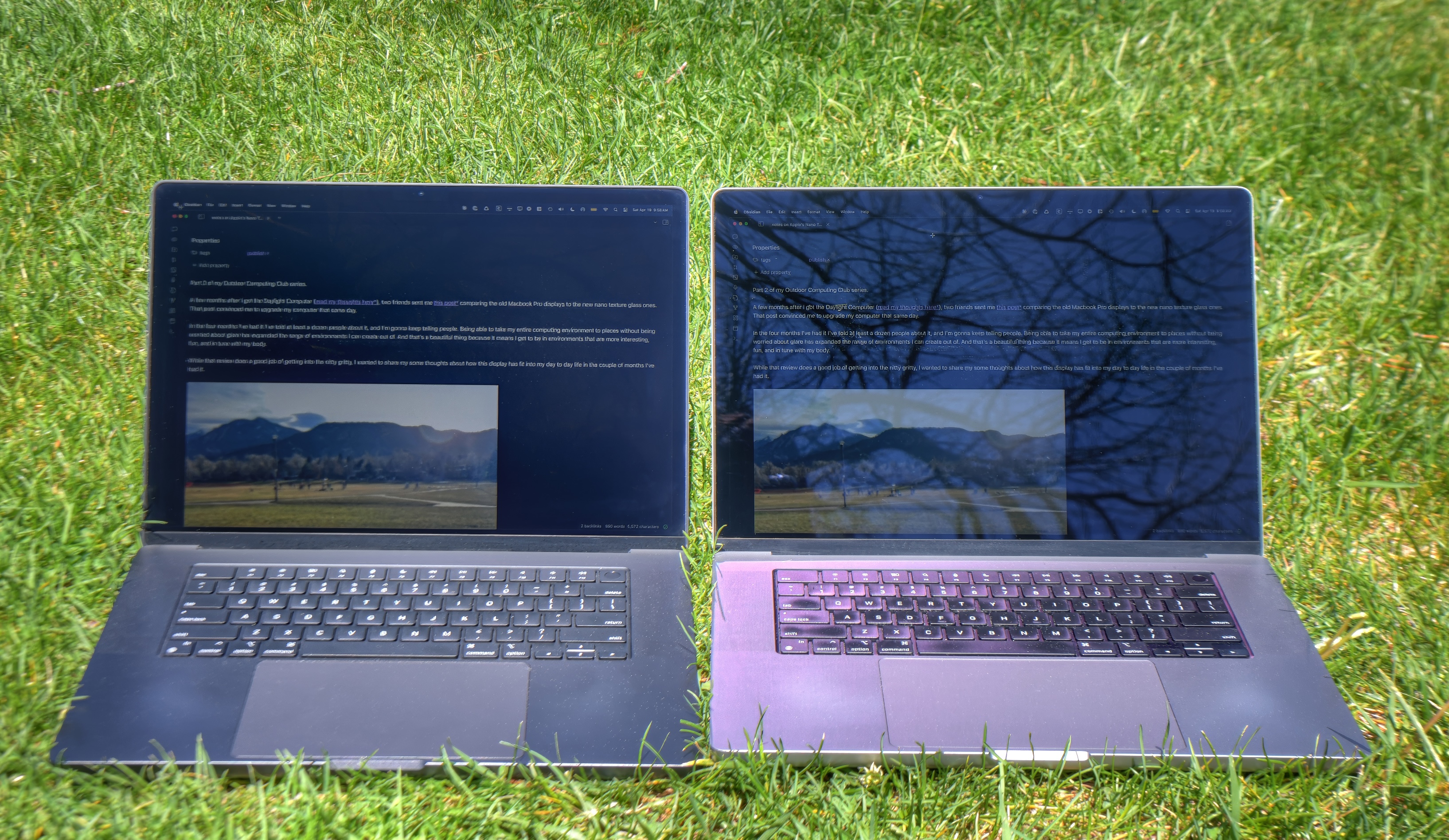
We've had matte screens for a long time that don't show glare. The problem is, the blacks are much more washed-out because that light still has to go somewhere, so it's basically just being smeared across the entire display.
This page shows lots of side-by-side photos of content that is primarily white, and most of the black bits (like text) are too small to make out.
The comparison needs to use things like busy photographs with bright areas and black areas. Then you can judge how much more washed-out the black areas look.
The second photo makes the Nano texture look pretty washed-out, but sadly doesn't include the traditional glossy laptop next to it for comparison, so it's impossible to tell.
Also, in all the side-by-side photos the Nano screen looks like it's set to much brighter. So any fair comparison should have them set to equal brightness. There's no universe in which a glossy screen is going to make the white areas look darker, as they are in all these examples.
I'm very curious if/how the Nano is better, but unfortunately these photos don't do anything to demonstrate it.
If I was focused on watching movies, or grading photos in a dark room then glossy would be the way to go.
A glossy Apple Studio Display or iMac (both of which have a decent antiglare treatment despite being glossy) in an office setting for example isn’t too bad.
On the other hand, your average touchscreen laptop (which are always almost-mirrors with no hint of treatment, for some reason) with screen angled up slightly and overhead fluorescent tube lighting or a skylight on the other hand? Borderline useless if the screen isn’t bright enough to outshine the strong glare covering 40-60%+ of the screen.
It's admittedly a very obvious tradeoff, but part of me was hoping some new magic existed with the nano texture since everyone was ranting and raving about it on its release. Figured maybe just maybe it could've given me the best of both worlds. Nope. As it turns out people who make "review videos" often times don't know what the hell they're talking about. I've learned to tune those out and just source my purchasing info from people who do things im also interested in doing. In practical application it was an easy decision to make. For my use case glossy display just made more sense, I dork with photos/videos many times a year whereas I sit outside in the sun with my laptop maybe once a year if I'm traveling. And even in those scenarios the glossy display is fine.
The nano-texture has less contrast.
"The nano-texture adds a filter-like appearance, resulting in a lower contrast ratio than the glossy panel. That said, there are differing opinions about the subjective appearance of the raised blacks. Some say it's a dealbreaker, while others prefer it, arguing that it looks more like what you would see on paper. The glossy panel produces a deeper, more Google Pixel HDR type of contrast that some find unnatural." — https://www.rtings.com/laptop/learn/apple-nano-texture
tl;dr in perfect lighting conditions - which I noticed the Apple Store did a pretty good job at - the glossy screen wins, obviously. The contrast is quite a bit better, pictures really pop, and text isn’t particularly affected. In anything other than perfect lighting, Nano Texture wins by a mile.
If you’re going to be doing any kind of photo or video work, you’ll probably want the glossy screen, or (what I suspect most would have) the Nano Texture, with a dedicated external monitor for the best of both worlds.
If you’re primarily using your laptop for anything other than photo / video work, or if you use it mobile, you want the Nano Texture screen. I can’t objectively say what you lose in contrast ratio, but it’s not bad enough to overcome the huge disparity in glare reduction. I haven’t regretted my Nano Texture MBP for a second.
I suppose if you really wanted to get fancy you could calibrate the nano texture screen against the proper monitor and then add an export filter that accounted for the contrast adjustment when using your machine portably
A physical glare shield (top and sides of screen ) might be the best of all worlds
Actually I do think I get this effect in sunny environments on my glossy screen, and end up wishing my work laptop had the nano texture.
Ultimately, I bought the nano-texture 16", and have not hesitated on that choice once. It's also far easier to maintain; while the glossy screen just gets nasty over time, the nano-texture is still pretty much mint after a year.
The blacks are getting washed out from light in the room that is diffused by the matte finish. Not light coming from the pixels.
The final black contrast is limited by both the underlying pixel technology and the screen finish. You get true black only with both OLED and glossy.
The hardness of the coating is getting better with every generation. I'm on my M1 MacBook, which I'm using for ~4 years every day. The scratches are visible, but becomes almost invisible when I clean the screen. Moreover they're invisible when the screen is on. My 10 year old Unibody also has them, and while they're worse, they're not visible either.
The best defense is having a padded case and using it even carrying in a bag. Carrying a cloth can bend and damage the screen in worse ways.
For infrequent cleaning of hard-to-remove smudges, you can moisten the cloth with a 70-percent isopropyl alcohol (IPA) solution.
But never apply it directly on screen. I think it's important to mention you just do not use "some alcohol" but it should be 70% isopropyl alcohol solution.
Btw. alcohol is a very good way to destroy the old glossy screens (non nano texture).
Respectful disagree. My partner's family's go-to surface spray has always been a home-made mix of ~30% methylated spirits to water. That's the only bench spray I've used for 10+ years and I can report it's as effective as any commercial spray, and 10% the price. Just mix it at home and use it everywhere. Kitchen, bathroom, anywhere else. I speak as a clean-freak. It works.
It's also amazing for cleaning laptop screens. I spray it directly on. I shouldn't. I do. I type this on a 5-year-old Macbook Air whose screen has been cleaned countless times using this method. It looks like this. (The moon-surface-like texture at the top is the texture of the reflected wall, above.) https://share.cleanshot.com/bnHrCQDZ
1. Make this mixture in a $1 spray bottle at home.
2. Lock your laptop and press Escape so the screen turns off. Lay it screen-back-down, keyboard open at about 80°, so it sits on the bench.
3. Spray a small amount of this mixture on the screen, directly. But don't be shy. Just don't have the screen be swimming.
4. Wipe carefully with a kitchen towel.
5. Repeat as necessary.
So far the only danger I've found is catching an abrasive particle in the cloth in the wiping process. A pre-wipe can alleviate the issue.
https://www.amazon.com/dp/B01NCOUY05?th=1
Apparently they're 39.5% isopropyl alcohol. 1 wipe is basically enough to clean 1 laptop screen before it all evaporates. Been using them for over a decade now on my MacBook Airs.
Mild alcohol causing issues for MBP screens was primarily an issue with 2012-2014 "staingate" (due to defects in the coating process).
Lens wipes are only ~30% alcohol and are probably fine assuming correct application, but I guess given how often staingate has appeared as coatings get more complex there's a risk... Unfortunately you either have to tradeoff "contains alcohol but completely clean wipe" versus "alcohol free but using a cloth that might be contaminated by dust/grit".
Maybe you could do alcohol free eyeglass solution (or maybe even ROR fluid) + lens tissue (e.g. kimwipe).
I've written that because I remember of "staingate" of Apple Laptops. Apparently the 2012–2017 Retina models were really not okay with alcohol solutions.
So depending on the manufacturing year and alcohol solution percentage you can be fine with alcohol on glossy displays.
It's still true that: alcohol is a very good way to destroy the old glossy screens.
https://support.apple.com/guide/apple-vision-pro/use-zeiss-o...
https://support.apple.com/en-us/119574#:~:text=If%20you%20ca...
https://www.zeiss.com/meditec/en/myzeiss/instructions-for-us...
A while later I had an idea to mount an iPad to my fridge so that I could check the weather, add things to my shopping list, play music, etc. I bought the rather expensive iPad with Nano Texture screen and it has been amazing to use. There is a big window opposite the fridge, and without the nano texture the glare from behind makes it hard to read what’s on the screen.
Not sure I would enjoy nano texture on my MacBook. For outdoor use I found that Vivid is great to turn up the brightness using the extended range of HDR that Apple doesn’t otherwise allow me to use.
IPads are sort of the Platonic Ideal of the type of environment that he says is an issue. Fingerprints, chaotic environment, etc.
... on the iPad. I have a nanotexture MacBook and double-checked. It's textured all the way across. But you're right, the bezel of the iPad is glossy (1). Why would they do that? Is it masked off or a separate piece of glass?
(1) https://www.reddit.com/r/ipad/comments/1cwppel/m4_ipad_pro_s...
I'll be honest, it has made the writing like 20% better, but the touching about 50% worse.
The feel of the screen is somewhat irritating, though it looks nice when the backlight is dim so I thought I'd go to Apple and check out the nano-texture.
All I can say is that subjectively, I liked it even less.
I have no idea how people can live with nanotexture on iPad screens.
That said, a consistent issue I have with my Macbook Air and my iPad pro is that the "peripherals" touch the screen. My Macbook ends up with oily cubes where the keyboard and its edge has rubbed up against the screen display; and similarly on the iPad I have a perpetual line where the smart folio has its segments.
I thought I had unusually oily hands and started washing more frequently, but that seems to have made the problem worse somehow. :\
I've seen some people place a keyboard-sized microfibre cloth in between the keyboard and display but I'm not sure how well that actually works in practice. It might cause other issues.
The tolerance is tight enough here that folks used to damage their displays this way. You need an extremely thin layer here if you are going to do this.
https://www.apple.com/shop/product/mw693am/a/polishing-cloth
Being serious, I'm always wearing nitrile gloves if whatever I have to clean is dirty - plus it's also a protection against detergents. A spare Samsung phone I've got mid-pandemic I had to purify with isopropyl because young guy who was selling it clearly didn't care much about all the gunk.
Feel free to ask any other questions!
Are you bothered by anything similar on the MacBook?
I use a regular yellow microfiber towel (usually from the giant bag I pick up from Costco every few years)
Afterward I use it to wipe off the screen.
Personally I’ve never had any issues with screen coating except on the older 2012-2015 MacBook Pros where my fingernails eventually caused the coating to scratch by the webcam (when opening the display, I suspect)
A note about new microfiber towels: they need to be washed prior to use or they’ll leave little bits of plastic micro fibers all over whatever you’re trying to clean
Most of the time plain water and moist microfiber towel will make it look new again.
It does nothing for wear on the keycaps though my command key and a few keys like A, Z, W, and S are wearing away and look slightly glossy.
Works great, I keep it in the padded pocket in my laptop bag next to the computer and the drawing tablet and take it out when I'm sitting in the park.
I would never consider a matte display at home because I keep my computers in dark environments like a real nerd.
- It was thinner overall than a Macbook Air, BEFORE it came out (watching people get hyped about Air's was just a snooze)
- Transreflexive screen in color (like that "daylight computer" in TFA), not the brightest when it comes to light but certainly bright enough, and more improtantly worked 100% without issues outside in the sun (turning the screen _towards_ the sun was actually a better choice!). It's really a shame they went out of favour for "glossy" displays.
- Extra ram and that Pentium M cpu that was neck-to-neck with P4's for certain workloads (telling people of compile times had people in disbelief)
The nano texture screen coating is clearly better for my purposes vs a glossy screen. Reading text gives less eye strain and there’s a slight ePaper-esque quality to things that’s just relaxing. Maybe some argument to be had for pure media consumption or image editing.
I don’t think Apple’s screen coating tech is anything magical or different to what’s on tons of decent monitors, Benq for one.
For marketing reasons, Apple only make this screen available in the MacBook Pro. For my use, this is needless extra cost, weight and bulk. I’m already paying hundreds extra for a coated screen, there’s no reason it can’t be made available on the MacBook Air too.
I’d still buy a MacBook if nano coating didn’t exist, the screen ratio, SoC and trackpad quality are still not close to being matched. Not to mention the fact that basically no other laptop is even available to buy in the UK with a US keyboard layout.
It's not high dpi, it's a retina display!
It's not a matte display, it's a nano texture!
Nano texture is not a coating. It is different than the coatings offered by competitors because of this.
Steam Deck nano-textured display: late 2023
Apple nano-textured display: late 2019
Might be the same but Apple have a 4 year headstart.
> Apple didn't invent anything
They do have the patent though - https://patents.google.com/patent/US11199929B2/en
And no, it is not exactly the same tech.
Now they can sell you "nano texture" at a premium after getting you hooked on functionally terrible displays (they look pretty in the store though).
My worst experience with glossy displays was when I had to perform some work outside on a sunny day and I comically could not see a single thing. It looked like a pure black square. I laughed, packed up and left, and told my boss it wasn't happening.
There is no worse eye strain that looking at anything that isn't supposed to be on the screen. It's 90% noise.
Unappealing PC matte screens are for old farts who can't appreciate sexy rounded corners and perfectly rendered fonts¹
¹ assuming your display yields over 300dpi
If you are a cool kid, you'll prefer glossy screen any day. Only with deep contrasty blacks will you be able to appreciate your low-contrast macos interface or your low-contrast VScode solarized theme. Occasional gorgeous reflection of stunning you squinting at the screen is just a nice bonus.
But I have to give it to Apple: PC glossy screens are mostly even worse.
Def a tradeoff that depends on your lifestyle if you work outside a lot (or want to). It does look nice there in the mountains
For outdoor use, I've had some decent success with the app Vivid which hijacks various MacOS abilities to superbrighten your display: https://www.getvivid.app/
In this particular case it's probably fine because the pictures are outdoors, and the reflections are (presumably) far away, so parallax isn't that much of an issue.
I could have added, also maintain the exact camera position too.
And had I spent more thought on replying, I'd suggest a short video would surely be most informative. I liked the article overall.
All that to say, this Jon.Bo statement "Basically, it’s a coating" is false. It's not a coating. When you're looking at a nanotexture screen, you're just looking through glass.
Since I'm sure someone will challenge me, I looked it up. Here's Apple's patent: https://patents.google.com/patent/US20220326413A1/en
and the key section from paragraph 0117:
"The surface of the glass cover member may then be chemically etched. Chemical etching techniques for glass cover members may involve using a suitable acid or base (e.g., a hydrofluoric acid-based etchant)".
I love their little redirections, like "a suitable acid or base".
Also: don't try this at home kids. Quick notes from our friend Gemini:
Safety & Dangers of HF Vapor
* Extreme Hazard: HF vapor is highly corrosive, toxic, and can cause severe burns, blindness, and systemic poisoning, even at low concentrations.
* PPE Required: Full protective gear, including chemical suits, respirators, and face shields, is essential.
* Ventilation: Must be done in a dedicated, high-flow chemical fume hood with water access.
There are also paragraphs describing applying "a plurality of inorganic dielectric layers".
Like most patents, it's hard to understand what has actually gone into production here. Could be done in a variety of ways consistent with the patent. The inorganic coatings are mentioned in claim 1, so the actual new aspect is probably the combination of etching and specific coatings.
Dunno how that interacts with the nano texture, but I feel like it's made my MacBook screens last a decent bit longer. There's other brands that also make these kinds of cloths, but Apple lowered the clearance between the keyboard and screen after around the 2016 MacBook? So the old brand I was using stopped fitting.
I wrote about it at https://beautifulruby.com/articles/portable-workstation-iter... if you want to see the setup.
“Step forward” that wouldn't have been needed in the first place if Apple didn't kill mat screens in the first place.
> I’ve learned to bring my special wipe when I bring my laptop, and I slip a few rubbing alcohol wipes in there as well.
Not for me then, the extra flexibility wouldn't be worth the loss of convenience; I prefer low maintenance and I work mostly indoors anyway. Still, good to have options, I guess.
In any case, that was a good and helpful review!
Works great. I also got a huge one for my TV. Once I learned how to press the bubbles out I was good. The trick is to use a larger bubble to catch the smaller ones and press them out the sides.
I really believe something needs to be done on that issue. As the author said, this isn't a new issue and is becoming the weak spot of any MacBook. Like we have full metal shell but the own keyboard causes damage to the screen.
https://www.apple.com/shop/product/mw693am/a/polishing-cloth
But perhaps that's a north america only thing and other countries continue to receive stickers.
How are fingerprints on iPad Pro nano texture touchscreens?
I bought a Paperlike 3 screen protector and it's ok. Not great, not terrible.
I do not recommend buying nano texture screens without having seen one. I get it that some people won’t be bothered but it’s a big no-no for me. Traditional matte screens are way better.
umm, anti-glare/matte used to be the norm for LCD. Around 2005-2006 that changed. As laptops became more of a consumer product, and DVD watching was an important usage, the glossy screens became the norm.
https://forum.thinkpads.com/viewtopic.php?t=26396
So, I would call it a massive step backwards! The 2006 MBP had an optional glossy screen, and the 2008 was the first one with default glossy. Around 2012 Apple dropped the matte option altogether.
> Etched into the glass at the nanometre level, the nano-texture scatters light to further minimise glare
So both matte displays and nano-texture glass scatter light, and they both reduce contrast.