386 pointsby huseyinbabal2 days ago38 comments
  • kristiandupont2 days ago
    Only tangentially related, but: what is the appeal of TUI's? I don't really understand.

    The advantages of CLI's are (IMO) that they compose well and can be used in scripts. With TUI's, it seems that you just get a very low fidelity version of a browser UI?

    • chazhaz2 days ago
      The advantage of TUIs is that you get a low-fidelity browser UI that doesn’t need to be exposed to the internet, that can be run remotely via SSH, which doesn’t ship you megabytes of JavaScript, and which works equally well on everyone’s machine
      • oneeyedpigeona day ago
        > doesn’t need to be exposed to the internet

        [PWAs: Offline and background operation](https://developer.mozilla.org/en-US/docs/Web/Progressive_web...)

        > that can be run remotely via SSH

        Fair

        > which doesn’t ship you megabytes of JavaScript

        Not required at all; that would be a decision the app makes and not inherent to the medium

        > works equally well on everyone’s machine

        Provided they're using a compatible terminal with a compatible color scheme that doesn't just make everything unreadable.

        • infogulcha day ago
          > > which doesn’t ship you megabytes of JavaScript

          > that would be a decision the app makes

          OK but as soon as some moron with a Product Manager title gets their grubby little fingers on it the app does start shipping megabytes of JS in practice. TUI's can't, that's the advantage.

      • spwa4a day ago
        Don't forget about the speed and the keyboard-only navigation.
      • wubrra day ago
        You can run a web UI locally, without exposing it to the public internet, and access it remotely via SSH.

        > which works equally well on everyone’s machine

        Why are you so sure it runs equally well on everyone's machine? Even big popular TUIs like Claude Code do not really accomplish this.

    • MrGilbert2 days ago
      They are usually faster to create and pretty much cross-platform. They should also work great with screen readers, though that is only an assumption.

      TUI also means that I do not have to memorize an infinite amount of command line parameters.

      I really like well-made TUIs.

    • rgoulter2 days ago
      Practically? The best keyboard-driven programs are (incidentally) TUIs.

      For some reason, expressive keyboard-driven interfaces aren't as popular in GUI interfaces.

      • peiskos10 hours ago
        My issue with TUIs is the lack of a simple interaction model. Every tool invents its own navigation style like vim bindings, custom key combos, mouse-driven flows and there’s no common fallback. In GUIs, the mouse is always there if nothing else. Even basic things like tabbed navigation can become confusing in TUIs sometimes
    • lucideer2 days ago
      Apart from the apparent comparative ease of creation relative to GUIs (I suspect Electron apps may be easier than TUIs), I think the main benefits from a user perspective seems to be down to cultural factors & convention:

      - TUIs tend to be faster & easier to use for cli users than GUI apps: you get the discoverability of GUI without the bloated extras you don't need, the mouse-heavy interaction patterns & the latency.

      - keybindings are consistent & predictable across apps: once you know one you're comfortable everywhere. GUI apps are highly inconsistent here if they even have keybindings

      - the more limited widget options brings more consistency - GUI widgets can be all sorts of unpredictable exotic

      - anecdotally they just seem higher quality

      • tracker1a day ago
        For that matter, with modern terminals, you can still do mouse interactivity as an option. I think that working over an SSH terminal is pretty nice in and of itself even if you can self-host a web application.

        I've almost always got my terminal app open anyway, in the case of VS Code, I don't even need to switch to another app to use it.

    • oneeyedpigeona day ago
      You get a low-fidelity version of a browser UI with guaranteed keyboard support. If web apps had the same level of keyboard support, TUIs would be less appealing.
      • graemepa day ago
        They also expose relevant keyboard actions.

        The popularity of TUIs is a result of the poor usability of current GUIs.

        • coredog64a day ago
          In my experience, the AWS UI is actually pretty good at keyboard usability. The biggest issue with the UI is how long it can take API calls to fill in the data, and that would be the same for both the browser and a TUI.
    • victorbjorklund2 days ago
      Faster and easier to use. I love for example Lazygit. It’s the fastest way to use git (other than directly as a cli of course but if you want some graphical info lazygit is great)
    • mystifyingpoi2 days ago
      Look up k9s, it's a great example. But as sibling comments say, it's all keyboard driven and most actions are single keypresses.
    • ashu14612 days ago
      I had the same doubt. With CLIs you can make your own custom shortcuts, LLMs can use it to get things done for you as well. With TUIs I think either these are hobby projects or meant for people who are obsessed with speed.

      Though speed impacts are also something which I am uncertain about. Comparing Vim with IDEs, for sure there will be few things which are faster in vim but decent no of things which can be done faster in an IDE as well, so can't comment on your overall speed gains.

      • essepha day ago
        Tuis are fine if you've got a bunch of pets or cattle you admin over ssh
    • wtetznera day ago
      For one thing, you don't need to run them in a browser.
    • freeplaya day ago
      Memorizing CLI commands and typing/editing them over and over can be very time consuming.

      Use k9s for example. Let's say you want to determine where the value of an environment variable is coming from.

      1. 'kubectl get deploy -n example' (find the name of the deployment in question)

      2. 'kubectl describe deploy example-app -n example' (determine where the value for the env var is coming from)

      3. 'kubectl get cm example-app-config -n example -o yaml' (check the value of the referenced key in the config map)

      This is a very basic example but you can see where it lead to slow debugging that is made even slower by its propensity to typos and the need to look up command syntax. Once you get comfy in a well designed TUI, you can fly through this process in 10 seconds.

    • Cthulhu_2 days ago
      Before Windows / GUIs, everything was a TUI. Some of those applications were kept around for a long time even when Windows was mainstream, because they were faster. If you've ever seen an employee (or co-worker) work in one of those applications you'll see it. They can zip through screens much quicker than someone doing point and click work.
      • cube00a day ago
        It's truly an amazing sight, our payroll system was all text based screens. I had a question and the clerk ripped through like 10 screens to get the information I needed, we're talking 200ms human reaction speed through each screen.

        I also worked with a mythical 10x developer and he knew all the Visual Studio keyboard shortcuts. It was just like watching that payroll clerk (well, almost, we had under-specced machines and Visual Studio got very slow and bloated post v2008), I don't think I ever saw him touch the mouse.

    • thihta day ago
      I recently started using k9s after using kubectl for a while. It's just faster and more convenient. A well made TUI also offers a bit more discoverability than a CLI. If you know exactly what you're looking for the CLI is fine, but if you need to explore a little bit, a TUI is better.
    • whatever1a day ago
      The only real advantage is that you have access to a UI—ish everywhere, because the ssh server is running everywhere by default (at least at machines you would want to connect to).

      Http servers are not installed by default, and they are a pita to configure / secure.

    • d4rkp4tterna day ago
      TUIs can be self explanatory if designed well. Ideally the same tool would have a CLI mode with JSON(L) formatted output, launched with a flag like —json so that it can be composed (unix-like) with other CLI commands, and also usable by LLM-agents, with jq etc. This is what I do in a TUI/CLI tool I’ve been building
    • benterixa day ago
      Many tools offer both CLI and TUI interface. TUI is especially useful at scale, when you need to deal with a large amount of resources efficiently or have a good overview of the whole environmtnt faster - e.g. *top, k9s, Midningt Commander etc.
    • rockwotj2 days ago
      you also get a very slimmed down interface that is usually way faster to load. one of the reasons I love HN is that it is super snappy to load and isn’t riddled with dependencies that take forever to load and display. Snappy UIs are always a breath of fresh air.
      • cube00a day ago
        > Snappy UIs are always a breath of fresh air.

        UIs used to be more responsive on slower hardware, if they took longer then the human reaction time, it was considered unacceptable.

        Somewhere along the line we gave up and instead spend our time making skeleton loading animations as enticing as possible to try and stop the user from leaving rather then speeding things up.

    • israrkhan21 hours ago
      I was skeptical too, but after trying lazygit, lazydocker, k9s and a few more TUI programs, I can see the value.
    • chilli_axe2 days ago
      In addition to what other commenters said - TUIs can be installed on a server and used over SSH
      • qudata day ago
        This is the part that I like the most, which is why I created https://pico.sh

        Further, when building ssh "apps" you can build out tooling for client clis that already exist (e.g. rsync, sftp, scp, sshfs). This provides ergonomics because now users aren't required to install extra tools to deploy static sites, for example.

        The entire experience is pretty seamless since all developers use SSH anyway.

      • makapufa day ago
        Well CLI and web UIs can also be used remotely. (Arguably even x11 apps can.)
        • cube00a day ago
          Even with compression on, running most apps like a web browser over x11 forwarding, is slow to the point of almost being unusuable.

          However running web apps over forwarding is pretty decent. VS Code and pgAdmin have desktop like performance running in the browser SSH port forwarded from a remote server.

    • korsea day ago
      Sometimes a gui is helpful for things (such as monitoring) but you don't want to leave your terminal because it screws with your workflow.
    • jama2112 days ago
      The appeal is I can use it with just a terminal connection to the server
    • perrygeoa day ago
      > low fidelity version of a browser UI?

      That's the point. For me, with very few exceptions, modern web UI is steaming pile of dogshit - no consideration for user's attention, speed, or usability. TUI are extremely low fidelity; there's nowhere to hide all that enshitified cruft! Stripping the functionality down to its bare essence vs navigating a bespoke web UI with the design aesthetic of clown vomit. I can tell you which one is more productive for me.

    • 2 days ago
      undefined
    • nobleacha day ago
      I can give an anecdote if that's helpful. Imagine you're wanting to download an object from S3. You start to type out the command in your CLI. You hit enter, only to realize, see that the object is not found. You have a typo somewhere... but where? The bucket is huge so, you resort to listing the contents and passing the results through grep. Then you copy the object to the clipboard so that you can edit your original command.

      I see one of the other comments mentions K9s. The exact same use cases manifest with that tool. YES, if it's just a one-shot, nothing beats the CLI. Many things where you need to investigate the resources a bit more, lend themselves to a TUI (or GUI if that's your thing).

      I come from an era where folks could fly through tasks on dumb terminals. (AS/400 apps). The moment we gave them "better" gui tools, they slowed way down. No matter how many times we told them, "you can still use your TAB and ENTER keys!" TUIs were just a sweet spot.

  • tianqi2 days ago
    I couldn't get this to run successfully.

    More broadly, I have concerns about introducing a middleware layer over AWS infrastructure. A misinterpreted command or bug could lead to serious consequences. The risk feels different from something like k9s, since AWS resources frequently include stateful databases, production workloads, and infrastructure that's far more difficult to restore.

    I appreciate the effort that went into this project and can see the appeal of a better CLI experience. But personally, I'd be hesitant to use this even for read-only operations. The direct AWS cli/console at least eliminates a potential failure point.

    Curious if others have thoughts on the risk/benefit tradeoff here.

    • falkensmaize2 days ago
      This was my first thought too. We already have terraform for repeatable, source controlled service provisioning and we have the relatively straightforward aws cli for ad hoc management. I don’t know that I really need another layer, and it feels quite risky.
      • baby2 days ago
        cdk bro
        • rswail2 days ago
          Terraform CDK is just a layer on top of terraform to avoid writing HCL/JSON.

          It's also deprecated by Hashicorp now.

          CDK on AWS itself uses CFN, which is a dog's breakfast and has no visibility on what's happening under the covers.

          Just write HCL (or JSON, JSONNET etc) in the first place.

          • baby10 hours ago
            Not sure what's a dog breakfast, but why care about what's happening under the cover? You can't know what's happening anyway in AWS.
        • SteveNuts2 days ago
          I thought that was deprecated?
          • sathyabhat2 days ago
            cdktf is, not AWS CDK. The former allows you to use Terraform without HCL, the latter is a generator for CloudFormation.
        • hhh2 days ago
          Am I the only person that despises CDK? Why would I use a cloud specific language instead of something like opentofu?
          • coredog64a day ago
            CDK's twin problems are that it compiles down to CloudFormation and that AWS did a terrible job at supporting languages other than TypeScript. The latter is theoretically fixable with a native FFI library that is called from each language, but the former is too leaky of an abstraction.
            • baby10 hours ago
              I've only ever used it with ts and thought the experience was pretty good (especially compared to terraform)
          • baby10 hours ago
            Considering all the downvotes I got I guess you're not the only one. I'm surprised because I really like cdk. It makes creating an AWS stack really easy, and for having dealt with terraform configurations that were trying to deal with multiple cloud platforms I'd rather have a per-platform eDSL
    • 3uler2 days ago
      The read-only hesitation seems overcautious. If you’re genuinely using it read-only, what’s the failure mode? The tool crashes or returns bad data - same risks as the AWS CLI or console.

      The “middleware layer” concern doesn’t hold up. This is just a better interface for exploring AWS resources, same as k9s is for Kubernetes. If you trust k9s (which clearly works, given how widely it’s used), the same logic applies here.

      If you’re enforcing infrastructure changes through IaC, having a visual way to explore your AWS resources makes sense. The AWS console is clunky for this.

      • catlifeonmars2 days ago
        > what’s the failure mode?

        The tool misrepresents what is in AWS, and you make a decision based on the bad info.

        FWIW I agree with you it doesn’t seem that bad, but this is what came to mind when I read GPs comment

        • jama2112 days ago
          Fair. Best use might be to double check on the proper UI before making any big decisions, and just use it as a general monitor
        • 3ulera day ago
          I mean sure… but to me that is as likely as the official ui misrepresenting the info.
    • pgroves2 days ago
      All the use cases that popped into my head when I saw this were around how nice it would be to be able to quickly see what was really happening without trying to flop between logs and the AWS console. That's really how I use k9s and wouldn't be able to stand k8s without it. I almost never make any changes from inside k9s. But yeah... I could see using this with a role that only has Read permissions on everything.
    • zeroimpla day ago
      The AWS APIs are quite stable and usually do exactly one thing. It’s hard to really see much risk. The worst case seems to be that the API returns a new enum value and the code misinterprets it rather than showing an error message.
    • zmmmmm2 days ago
      I guess it's the kind of thing where you want an almost Terraform like "plan" that it prints out before it does anything, and then a very literal execution engine that is incapable of doing anything that isn't in the plan.
    • nfRfqX5na day ago
      With properly scoped roles I would not be concerned
  • kylehotchkiss2 days ago
    Should have a Price Of Current Changes menu bar item! So you can see if your changes cost $.01 or $10,001.
    • bdbz2 days ago
      If only Amazon made it so simple
  • lherron2 days ago
    Somehow every 15 line shell script I write now turns into a 50kloc bun cli or tui app. Apparently there are many such cases.
    • viraptor2 days ago
      Different use cases. I want aws-cli for scripting, repeated cases, and embedding those executions for very specific results. I want this for exploration and ad-hoc reviews.

      Nobody is taking away the cli tool and you don't have to use this. There's no "turns into" here.

      • lherrona day ago
        Oh I think you misinterpreted my comment! I am very much a fan of this, wasn't throwing shade. I am just remarking on how my side-project scope today dwarfs my side-project scope of a year or two ago.
        • viraptora day ago
          I did :) and I from votes I'm guessing many others too. Text communication remains hard as usual, sorry about that :(
    • toomuchtodo2 days ago
      Terminal electron.
  • latchkey2 days ago
    I run a neocloud and our entire UX is TUI-based, somewhat like this but obviously simpler. The customer feedback has been extremely positive, and it's great to see projects like this.

    ssh admin.hotaisle.app

    • Imustaskforhelp2 days ago
      Oh this looks really interesting as well.

      Can you tell me more about what do you mean by Neocloud and where are you exactly hosting the servers (do you colocate or do you resell dedicated servers or do you use the major cloud providers)

      this is my first time hearing the term neocloud, seems like its focused on AI but I am gonna be honest that is a con in my book and not a pro (I like hetzner and compute oriented compute cloud providers)

      Share to me more about neoclouds please and tell me more about it and if perhaps it could be expanded beyond the AI use case which is what I am seeing when I searched the term neocloud

      • latchkey2 days ago
        Neocloud has come to refer to a new class of GPU-focused cloud providers. Sure, most of our customers use us for AI purposes, but it is really open to anything GPU related.

        We buy, deploy and manage our own hardware. On top of that, we've built our own automation for provisioning. For example, K8S assumes that an OS is installed, we're operating at a layer below that which enables to machine to boot and be configured on-demand. This also includes DCIM and networking automation.

        We colocate in a datacenter (Switch).

        • otterley2 days ago
          Rackspace called; they want their business model back. :P
          • latchkey2 days ago
            imitation is the sincerest form of flattery. the rackspace folks did a great job.
            • otterley2 days ago
              I’m not sure these Neoclouds have Rackspace’s Fanatical Support, though.
              • latchkey2 days ago
                We're developers ourselves, so we're treating everyone as we'd want to be treated.
        • kortilla2 days ago
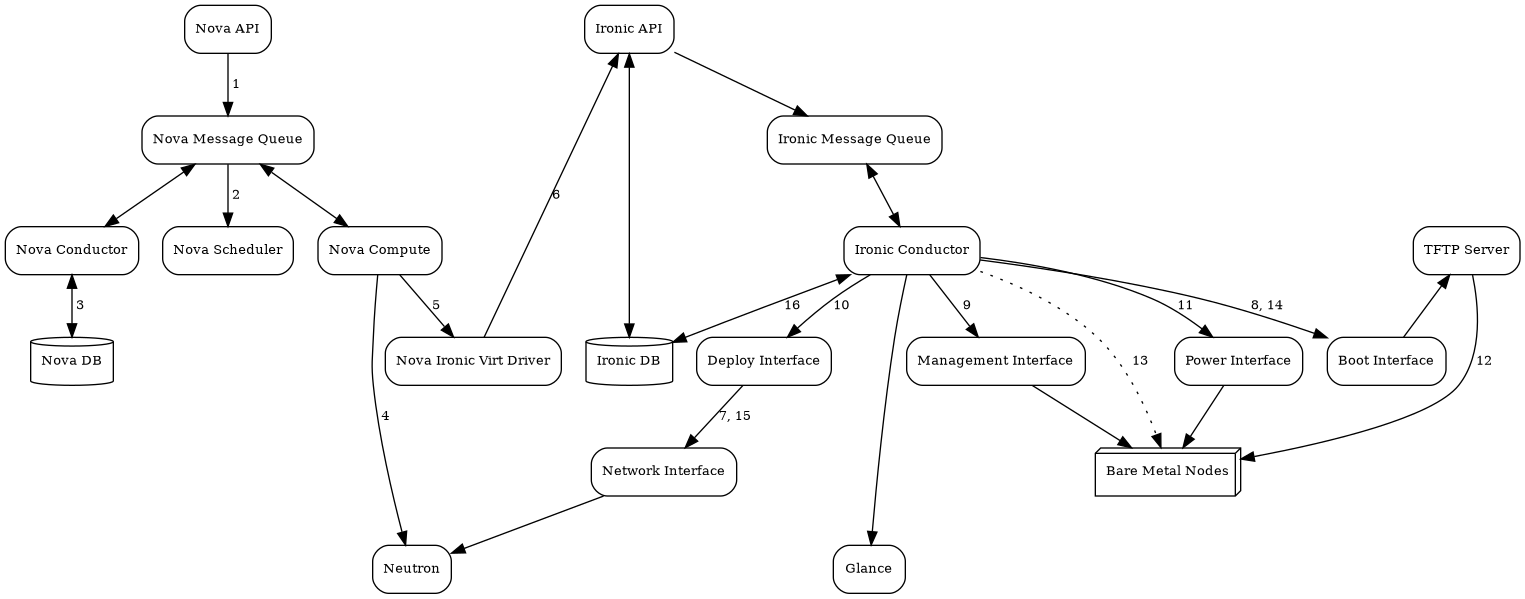
          This is sometimes called bare metal as a service.

          Ironic is an open source project in this space if people are curious what this looks like.

          • latchkey2 days ago
            We built our own ironic. Instead of a ton of services and configuration, we just have a single golang binary. Our source of truth is built on top of NetBox. We integrate Stripe for billing. We're adding features as customers ask for them.

            While it is a lot of moving parts coordination, I'm not sure I agree with the complexity...

            https://docs.openstack.org/ironic/latest/_images/graphviz-21...

      • solumunus2 days ago
        > seems like its focused on AI but I am gonna be honest that is a con in my book and not a pro

        A service you have no use for or interest in is “a con in your book”, what?

  • alberth2 days ago
    Embarrassingly dumb question: if you’re one of the few users who don’t run a dark background terminal … how well do these TUI render (in a light background)?
    • deepspace2 days ago
      Not a dumb question at all. I grew up using actual green screen terminals, and the advent of high-resolution colour monitors and applications with dark text on a white background felt like a blessing. I truly do not understand the regression to dark mode. It's eyestrain hell for me.

      Unfortunately, I was unable to test in my light-background terminal, since the application crashes on startup.

      • alanbernstein2 days ago
        If I'm working in a dark room, then light mode is eye strain hell. With dark mode, the minimum brightness I can achieve is about 100x lower than with light mode.
      • zozbot2342 days ago
        OLED monitors will bring green screen terminals back in style quite soon (with occasional orange and red highlights for that Hollywood haxx0r UX effect)
        • zaochen12242 days ago
          The worst is when you're in dark mode and suddenly open a website or PDF that's pure white. Instant flashbang.
          • hxugufjfjf2 days ago
            I thank Apple every day for adding dark mode to the native PDF viewer for this exact reason.
    • oneeyedpigeona day ago
      My personal experience is mixed. Half the time, I get something usable, the other half I get something that prints light yellow on slightly-darker yellow or highlights an item with a dark blue background and dark green text. I'm sure there's something I can tweak in my terminal app to fix this, but it's easier to just avoid those apps.
  • sylens2 days ago
    Looks great! If you have multiple AWS accounts in your org, you probably want to use something like aws-sso-util to populate your profiles so you can quickly swap between them
  • ronbenton2 days ago
    I thought the title meant the AWS UI was “terminal”, which I would be on board with
  • shushpanchik2 days ago
    > // TODO: Handle credential_source, role_arn, source_profile, sso_*, etc.

    So it does not support any meaningful multi-account login (SSO, org role assumption, etc), and requires AWS_ACCESS_KEY_ID/AWS_SECRET_ACCESS_KEY. That's a no-no from security POV for anything in production, so not sure what's the meaningful way to use that.

    • huseyinbabal2 days ago
      I also care security part, but this is just beginning :) New features will be added iteratively based on community requests, and it seems there are plenty of good requirements in HN thread, thanks
    • zeroimpla day ago
      You or the developer could piggy back on “aws configure export-credentials --profile profile-name —-format process” to support any authentication that the CLI supports.
    • fosron2 days ago
      Yeah, without SSO support this is a no-go for me too.
  • mrichman2 days ago
    Crashes on first use. Not a good way to go viral.
    • huseyinbabal2 days ago
      There was a resource handling problem, but it is fixed in 1.0.1 that you can try
    • bcb_10002 days ago
      [flagged]
      • mrichman2 days ago
        Yours doesn't work either. It's looking for a license file.
        • bcb_10002 days ago
          Mine is paid, not open source. You'd have to buy a license, but this has me thinking about just open sourcing it too.
          • joshribakoff2 days ago
            Your code can’t be both open source and closed source. In the other comment you wrote that he lifted your open source parts. Now you’re saying your code is not open source. People are allowed to copy open source code and you’re not even being consistent about whether your code is open source
      • johntash2 days ago
        Your pricing page says:

        > $3.33/mo

        > Per user, per machine.

        Is that really per machine? That seems a bit steep? If I wanted to use it on a laptop and a desktop, I'd need two licenses?

        • bcb_10002 days ago
          It's per account. You can use a license anywhere honestly, just copy it to whatever machine.
          • Corrado2 days ago
            When you say per account, do you mean per user account or per AWS account?
      • wolttam2 days ago
        OP’s looks a lot more inspired by k9s than what you produced.

        Sorry but ideas (and now-a-days implementations) are cheap. Let the best tool win (or more practically, just use what suites you and don’t worry about it if others prefer another tool over yours. Especially don’t worry about it if someone uses an LLM to reproduce what you already did; that’s just the rising tide of LLM capabilities.)

        • minimaxir2 days ago
          And if the original app did indeed code it manually while the OP used LLMs, that gives the original a professional edge to adapt to bugs/issues and update with a better knowledge of the underlying code.
      • ranger_danger2 days ago
        Looks more like a copy of https://github.com/clawscli/claws to me.
  • brendank3102 days ago
    Nice! A while back I had started something similar for Azure but it never really got traction (or nearly as polished as this!). It's a rough proof of concept but maybe it'll be useful to Azure users:

    https://github.com/brendank310/aztui

    • NSPG9112 days ago
      Seems like everyone is interested in Rust, but yours was written in Go.
      • catlifeonmars2 days ago
        Why does the implementation language of a TUI matter?
  • themafia2 days ago
    I wish more TUI designers would spend some time playing with Hercules and experiencing the old "mainframe" way of arranging interfaces. Those guys really knew what they were doing.
    • jxdxbx2 days ago
      I would like to know more about this. I love the resurgence of TUI apps but there is a samey-ness to them.
    • wilkystyle2 days ago
      Anything in particular you liked about them?
      • actionfromafar2 days ago
        They are like web forms. Fill in everything, then hit send.

        Fixed positions, shortcuts, tab-indexed, the order is usually smartly layed out. Zero latency. Very possible to learn how forms are organized and enter data with muscle memory. No stealing focus when you don't expect it.

        Optimized for power users, which is something of a lost art nowadays. GUIs were good for discoverability for a while but increasingly I think they are neither great for power users nor for novices, just annoying and yanky.

        • bionsystem2 days ago
          I remember airport hostesses when they used it to get your boarding pass from the mainframe, it took them 5 seconds and a few key-strokes like 3 letter of my name to get the job done. When they switched to web-uis some year, I vividly remember seeing them, 4 at a time on the same screen, trying to figure out what was going on. Took them 15 minutes and a phone call to get the boarding pass ready. I feel sad when I think about this.
        • mixmastamyk2 days ago
          Were these 3270 or ansi terminals?
          • 3270
            • mixmastamyka day ago
              Right, that makes it easier to build a form-based interface. Other terminals can simulate the style, though there might be limitations I'm not familiar with.
              • A limitation with character terminals is you need the remote end to be real-responsive at all times and that latency is a real killer.

                With a 3270 if the mainframe takes a second to give you the next form, that's not a UX problem at all. If your character terminal takes a second per keypress, that's very painful and l a g g y.

                But character terminals were much cheaper, worse is better, so it won out.

        • __MatrixMan__2 days ago
          GUIs are for distracting otherwise uninterested users into doing what you want them to do.
  • jbreckmckye2 days ago
    Interesting, looks like k9s... but for AWS
    • jedimastert2 days ago
      That was my first thought too, it looks like it was directly inspired by k9s according to the bottom of the readme.
  • dmacvicar2 days ago
    Looks very nice! Need to test if it supports AWS_ENDPOINT_URL so it works with LocalStack.
  • politelemon2 days ago
    Please don't use or suggest using homebrew as a Linux installation solution. It's better to simply point at the binaries directly.
    • OptionOfT2 days ago
      Why?

      Is it the best out there? No. But it does work, and it provides me with updates for my tools.

      Random curl scripts don't auto-update.

      Me downloading executables and dropping them in /bin, /sbin, /usr/bin or wherever I'm supposed to drop them [0] also isn't secure.

      [0] https://news.ycombinator.com/item?id=46487921

      Also, I find it is usually better to follow up with something like:

      'It's better to use Y instead of X BECAUSE of reasons O, P, Q, R & S' vs making a blanket statement like 'Don't use X, use this other insecure solution instead', as that way I get to learn something too.

      • rodrigodlu2 days ago
        I use mise to update binaries. Especially TUIs that are not on the arch repos. It supports several backends, from cargo crates to GitHub releases, to uv for python and so on.

        So one doesn't really need homebrew that has Linux as third class citizen (with the 2nd class empty)

    • colesantiago2 days ago
      What's the problem with Homebrew?

      > It's better to simply point at the binaries directly.

      Binaries aren't at all signed and can be malicious and do dangerous things.

      Especially if it's using curl | bash to install binaries.

      • yoavm2 days ago
        Are you using Homebrew on Linux? Genuinely curious - I never met a Linux user doing that.
        • indigodaddy2 days ago
          Brew actually works very nicely for Linux and is a useful method to enable package management of cli tools/libraries at the user level.

          It's also widely accepted as one of the tools of choice for package persistence on immutable distros (distrobox/toolbox is also another approach):

          https://docs.projectbluefin.io/bluefin-dx/

          Also, for example I use it for package management for KASM workspaces:

          https://gist.github.com/jgbrwn/28645fcf4ac5a4176f715a6f9b170...

        • serpix2 days ago
          Linuxbrew is absolutely fantastic. No need to mess with apt repositories and can keep custom binaries separate from the os. Almost everything is there, and it just works.
        • embedding-shape2 days ago
          At least one other person also does:

          > as long as I have a basic Linux environment, Homebrew, and Steam

          https://xeiaso.net/blog/2025/yotld/ (An year of the Linux Desktop)

          I guess some post-macOS users might bring it with them when moving. If it works :shrug:

      • -mlv2 days ago
        I had some issues with brew breaking up my system and pkg-config.
        • colesantiago2 days ago
          It is a bit hard to know what the issue is here.

          But on average brew is much more safer than downloading a binary from the ether where we don't know what it does.

          I see more tools use the curl | bash install pattern as well, which is completely insecure and very vulnerable to machines.

          Looks like the best way to install these tools is to build it yourself, i.e. make install, etc.

          • garblegarble2 days ago
            >the best way to install these tools is to build it yourself, i.e. make install, etc.

            And you're fully auditing the source code before you run make, right? I don't know anyone who does, but you're handing over just as much control as with curl|bash from the developer's site, or brew install, you're just adding more steps...

            • colesantiago2 days ago
              > And you're fully auditing the source code before you run make.

              I mean you can?

              But that is the whole point when the source is available, it is easier to audit, rather than binaries.

              Even with brew, the brew maintainers have already audited the code, and it the source to install and even install using --HEAD is hosted on brew's CDN.

    • rswail2 days ago
      Also don't use Homebrew on MacOS because it screws around in /usr/local and still hasn't worked out how root is supposed to work.

      Use Macports, it's tidy, installs into /opt/macports, works with Apple's frameworks and language configuration (for python, java etc), builds from upstream sources + patches, has variants to add/remove features, supports "port select" to have multiple versions installed in parallel.

      Just a better solution all around.

    • yarekt2 days ago
      Nice, download a random binary off the internet and give it your AWS credentials.

      Please people, inspect the source to your tools, or don't use them on production accounts.

      • thejazzman2 days ago
        How did you install homebrew?
      • viraptor2 days ago
        > Please people, inspect the source to your tools, or don't use them on production accounts.

        This is not realistic. Approximately nobody installing AWS cli has reviewed its code.

        • johntash2 days ago
          Official AWS cli from AWS is a bit different than "random binary off the internet"?
    • frenzcan2 days ago
      What’s the issue with homebrew?
      • astrea2 days ago
        It’s specifically a Mac workaround package manager. There’s better/cleaner ways to do it on Linux.
        • bbkane2 days ago
          I love Debian's stability, but I rely on Homebrew (instead of apt) to get more recent releases of software. Overall it works swimmingly!
        • dangus2 days ago
          Unless you have immutable Linux where Homebrew is a preferred method of CLI tool installation.

          https://docs.bazzite.gg/Installing_and_Managing_Software/

          Linux is just a kernel, not everyone agrees on what is “better” and “cleaner” to use with it!

    • jbreckmckye2 days ago
      What's wrong with Brew?
      • huseyinbabala day ago
        What is the error? We can continue on github, I can do my best
    • dangus2 days ago
      As a user of immutable Linux (bazzite), I suggest speaking for yourself and not for others.

      On my platform, Homebrew is a preferred method for installing CLI tools. I also personally happen to like it better on Linux than Mac (it seems faster/better).

      https://docs.bazzite.gg/Installing_and_Managing_Software/

    • purerandomness2 days ago
      brew is for users of non-Arch distros who want to experience what using Arch feels like.
  • stephc_int132 days ago
    How much of this was made with LLM?
    • otterley2 days ago
      Why does it matter?
      • risyachka2 days ago
        Because when a project is done in 10 minutes by llm - it will be abandoned in a week.

        When a person intentionally does it and spends a month or two - they far more likely will support it as they created this project with some intention in the first place.

        With llms this is not the case

        • otterleya day ago
          Why are you entitled to ongoing support of a free tool?

          How long are you entitled to such support?

          What does “support” mean to you, exactly?

          If the tool works for you already, why do you need support for it?

      • greekrich922 days ago
        A bug from slop could cost $10K
        • otterley2 days ago
          So could a bug introduced by a human being. What's the difference?
          • hxugufjfjf2 days ago
            Accountability is the difference.
            • otterley2 days ago
              An LLM is just an agent. The principal is held accountable. There’s nothing really all that novel here from a liability perspective.
              • hxugufjfjf2 days ago
                That was my point exactly. I just didn’t write it as precisely as you.
                • otterley2 days ago
                  Then I don’t understand. My point was that it doesn’t matter whether the machine or the human actually wrote the code; liability for any injury ultimately remains with the human that put the agent to work. Similarly, if a developer at a company wrote code that injured you, and she wrote that code at the direction of the company, you don’t sue the developer, you sue the company.
            • h33t-l4x0r2 days ago
              How exactly do end users hold AWS devs / AWS LLMs accountable
          • greekrich92a day ago
            The human
        • rolymath2 days ago
          How much would a bug from a human cost?
          • catlifeonmars2 days ago
            I’d be willing to bet the classes of bugs introduced would be different for humans vs LLMs. You’d probably see fewer low level bugs (such as off-by-one bugs), but more cases where the business logic is incorrect or other higher concerns are incorrect.
  • 2 days ago
    undefined
  • rbanffya day ago
    Is there a Rust port or binding for ncurses?
  • alexpadula12 hours ago
    Very cool
  • utkayda day ago
    Great TUI app. Kudos & Ellerinize saglik
  • dent92 days ago
    yea let me just give access to my company AWS account credentials to this program made by some random dude on the internet
    • serpix2 days ago
      If you have permanent credentials then you are already in great danger. You should be using temporary credentials with something like Granted.
      • shushpanchik2 days ago
        so stealing temporary credentials are fine, right?
  • petterroea2 days ago
    wow, that looks like k9s for aws. That's awesome
  • tvbusy2 days ago
    Nice idea but I won't trust a tool that first the commit is 11 hours ago.
    • bcb_10002 days ago
      The crazier part is a reddit post on AWS was made for someone releasing a $3 a month closed source version of this, that received a lot of traction, but a bit of flack for being closed source was made 3 hours before the first commit. This guy 100% took the idea and the open source parts and recreated it to post here. Look at the readme and compare them. It is almost a 1:1 copy of the other. This dude is hella sketch. And if this is getting traction we are cooked as developers.
      • otterley2 days ago
        That someone would be you (I saw that Reddit post: https://www.reddit.com/r/aws/comments/1q3ik9z/i_made_a_termi...). I'm not sure I would describe the collective response as having "a lot of traction"; most respondents panned both the price and the closed-source nature of the offering.

        What you're learning here is that there's not really a viable market for simple, easily replicable tools. People simply won't pay for them when they can spin up a Claude session, build one in a few hours (often unattended!), and post it to GitHub.

        Real profit lies in real value. In tooling, value lies in time or money saved, plus some sort of moat that others cannot easily cross. Lick your wounds and keep innovating!

      • joshribakoff2 days ago
        Please dont open source your code if you’re going to call people hella sketch for deriving from it. Did he violate your license? Attack that action, not the person doing open source.
        • minimaxir2 days ago
          To add since the poster is being confusing: this is the GitHub repo for their project: https://github.com/fells-code/seamless-glance-distro

          It is indeed not open sourced, as the repo only has a README and a download script. The "open source" they are referring to I think is the similar README convention.

          Which makes this comment they made on Reddit especially odd: https://www.reddit.com/r/aws/comments/1q3ik9z/comment/nxpq7t...

          > And the folder structure is almost an exact mirror of mine

          Even though Rust has patterns on how to organize source code, similar folder structure is unlikely, particularly since the original code is not public so it would have to be one hell of a coincidence. (the funniest potential explanation for this would be that both people used the same LLMs to code the TUI app)

      • LastTrain2 days ago
        “Someone”
    • jedimastert2 days ago
      It looks like the first commit was just a squash and merge, I probably would never trust a public commit history as some kind of source of truth anyways. I'm curious what your issue is?
      • lafrenierejm2 days ago
        > I probably would never trust a public commit history as some kind of source of truth

        What _would_ you trust as a source of truth for source code if not a public commit log? I agree that a squash commit’s timestamp in particular ought not be taken as authoritative for all of the changes in the commit, but commit history in general feels like the highest quality data most projects will ever have.

        • thejazzman2 days ago
          Until you realize it’s trivial for an LLM to fabricate it in about a minute
        • fragmede2 days ago
          I really hate when cryptocurrency has valid applications but in this case, you're looking for a public adversarial append only log system which is what a blockchain is.
  • bizim_oralar2 days ago
    looks good. definitely will try
  • very_clumsy2 days ago
    [dead]
  • 2 days ago
    undefined
  • gogasca2 days ago
    [dead]
  • 2 days ago
    undefined
  • acedTrex2 days ago
    [flagged]
    • johnj-hn2 days ago
      [flagged]
    • blutoot2 days ago
      So what if this was vibe-coded? How do you know this was a "slop" if you did not try it?
      • bcb_10002 days ago
        This guy took this idea from my post on reddit and made an open source version. It is def just ran through some agent, I can tell because look at how he defines regions? Look how he defines credentials, it doesn't make coherent sense. He read my reddit post saw the interest and is trying to run with it. Thats crazy.
      • llimllib2 days ago
        I'm not generally opposed to vibe-coded tools, I've even created some.

        However I wouldn't be excited to trust one with my AWS key and read/write access to my infra

        • lijok2 days ago
          Then don’t use AWS keys
        • rvz2 days ago
          Especially if it is has zero tests.
          • minimaxir2 days ago
            Zero tests are actually a better argument that it’s not AI generated. Agents love tests.
      • acedTrex2 days ago
        > How do you know this was a "slop" if you did not try it?

        Because I have eyes and can look at the code for 2 seconds. It's not very difficult to check for the hallmarks of careless slop code.

        If you can't tell in a few seconds then you can continue testing it out just like any actual project.

        • minimaxir2 days ago
          And what are those hallmarks in this case? There is no heuristic that is applicable for every programming language.

          Unfortunately, ratatui requires a lot of verbose code that may be indistinguishable from LLM generated code: https://ratatui.rs/examples/apps/demo/

          • joshka2 days ago
            https://ratatui.rs/examples/apps/demo/ is pretty much the oldest untouched remnant of code from tui-rs days (pre-ratatui fork in Feb 2023).

            Ratatui itself has a lot of much nicer AI generated code in it since then ;)

            We've also done a bunch of things to help drive down some of the boilerplate (not all of it mind you - as it's a library, not a framework like other TUI libs)

          • acedTrex2 days ago
            Easiest one is ridiculous comments, always a dead ringer for an LLM.

            ESPECIALLY when its from a plan and comments '// STEP 2: ...'

            Like here in this posts repo https://github.com/huseyinbabal/taws/blob/2ce4e24797f7f32a52...

            This a dead ringer for LLM slop that someone didnt even care enough to go through and clean up.

            Edit: Just to keep it going, you ever seen a human write dependencies like this for a small toy tui? https://github.com/huseyinbabal/taws/blob/2ce4e24797f7f32a52...

            Edit2: Sure why not, lets reimplement randomly a custom jsonpath when serde_json_path exists https://github.com/huseyinbabal/taws/blob/2ce4e24797f7f32a52...

            • viraptor2 days ago
              > Easiest one is ridiculous comments, always a dead ringer for an LLM.

              > ESPECIALLY when its from a plan and comments '// STEP 2: ...'

              There are people who actually program that way. The most extreme I know was Bogdan Iancu from OpenSIPS who I've seen create functions, write step-by-step comments for what they will do, then fill out the implementation.

              It's just a signal, not a certain thing.

            • minimaxir2 days ago
              That's not a smoking gun. I've definitely seen pre-2023 open source code mentioning steps in their comments. Even though that file also has a lot of tautological comments which are more indicative of LLM coding, it's not a smoking gun either: the frequency of comments is an editorial decision which has pros and cons.

              It's the equivalent of calling something an AI generated images just because the fingers are weird, and requires a judgment more concrete than "I have eyes."

              > you ever seen a human write dependencies like this for a small toy tui?

              Yes? That's just TOML syntax. I'm not sure which dependency in that list is excessive, especially for something that has to handle HTTP requests. If you mean adding a comment header for each section, then that's a better argument, but see argument above.

              • mahogany2 days ago
                The more you see and review LLM-generated code, the more you can detect its fingerprints. Obviously you're not going to prove this is LLM-generated. I wouldn't bet $1M that it is. This could be 100% human made.

                But read the same link from above: https://github.com/huseyinbabal/taws/blob/2ce4e24797f7f32a52.... LLMs leave temporal comments like "// Now do X", or "// Do X using the new Y", as responses to prompts like "Can you do X with Y instead?".

                or below: "// Auto-refresh every 5 seconds (only in Normal mode)". I would guess this comment was during a response to a prompt like: "can you only auto-refresh in Normal mode?"

                Sometimes there are tautological comments and sometimes not: https://github.com/huseyinbabal/taws/blob/2ce4e24797f7f32a52...

                ``` // Get log file path

                let log_path = get_log_path(); ```

                This is another signal to me that there is less human influence over the project.

                No, none of these are a smoking gun. Also none of this means it was completely vibe coded. To me personally, the worrying part is that these patterns signal that perhaps human eyes were never on that section of the code, or at least the code was not considered carefully. For a toy app, who cares? For something that ingests your AWS creds, it's more of a red flag.

                Edit: changed the language a bit to sound less sardonic. My comment is more about LLM signals than a judgment on LLM usage.

                • true_religion2 days ago
                  I recently had the pleasure of reviewing some of my oldest production code from when I had first left college.

                  It worked, no issue there, but the amount of commentary I included definitely surprised me.

                  I guess I really needed the support structure of comments to keep my logic on track back then, whereas now even convoluted map-reduce one liners are things I see as just obvious literate programming.

                  I did go a long while in my career still writing code that way when I had to share it with people. I don’t think I stopped until the only people reading my code were senior engineers with way more qualifications than I had.

                  So, I wouldn’t say just from this code that the creator is an LLM.

              • acedTrex2 days ago
                I mean if you want bury your head in the sand and try to play semantics over if its ENOUGH proof or not go right ahead.

                But it's more than LLM enough for anyone who has experience with them to conclude the LLM drove the majority of the output. Hence, slop

                • minimaxir2 days ago
                  To be clear, I agree that there was likely AI assistance with the code (as it will be a safe assumption going forward in SWE given the progress agentic LLMs have achieved in the past few months), but a) that doesn't intrinsically mean it's slop and b) the "all AI is slop" bit is intellectually lazy at best especially without objective evidence and doesn't lead to constructive HN discussion.
                  • acedTrex2 days ago
                    > a) that doesn't intrinsically mean it's slop

                    If it can quickly and easily be identified as LLM code then yes, it is intrinsically slop and of no value. The person who submitted it did not even value it enough to look at/clean it up. Why would anyone else care to look at it.

                    If it is LLM generated but then HAS BEEN cleaned up then you cant immediately see the LLM and it passes the check anyways.

            • justamaze2 days ago
              [flagged]
      • satvikpendem2 days ago
        Vibe code is by definition slop.
        • acedTrex2 days ago
          They are indeed synonyms
      • 77773322152 days ago
        [dead]
  • nirushiv2 days ago
    [flagged]
    • bcb_10002 days ago
      [flagged]
      • nostrebored2 days ago
        Ideas are cheap. Would be unsurprised to see an open source version of this get quite good faster than your $3.33 / machine version.

        This is such an obviously good open source idea as well. Just add enterprise features for orgs + collaboration.

  • ktevfik2 days ago
    [flagged]
  • dionian2 days ago
    [flagged]
  • Yanael2 days ago
    [flagged]
  • bschmidt250012 days ago
    [dead]
  • bschmidt250132 days ago
    [dead]
  • bschmidt250132 days ago
    [dead]
  • bcb_10002 days ago
    This guy stole this idea and basically the whole code base from another developer and ran it through an LLM to recreate it.
    • songodongo2 days ago
      I think you’re vastly overestimating how difficult this type of application would be to an LLM. There’s no need to steal another code base…isn’t yours closed source, anyways?

      You could probably get 90% of the way there with a prompt that literally just says:

      > Create a TUI application for exploring deployed AWS resources. Write it in Rust using the most popular TUI library.

    • bcb_10002 days ago
      • huseyinbabala day ago
        I didn’t take code or reverse-engineer anything from that Reddit project, and I wasn’t aware of it when I started.

        I’ve been a long-term k9s user, and the motivation was simply: “I wish I had something like k9s, but for AWS.” That’s a common and reasonable source of inspiration.

        A terminal UI for AWS is a broad, well-explored idea. Similar concepts don’t imply copied code. In this case, even the UIs are clearly different—the interaction model and layout are not the same.

        The implementation, architecture, and UX decisions are my own, and the full commit history is public for anyone who wants to review how it evolved.

        If there’s a specific piece of code you believe was copied, I’m happy to look at it. Otherwise, it’s worth checking what someone actually built before making accusations based on surface-level assumptions.

      • smcnc2 days ago
        It’s pretty clear it was your post/project you reference, but how do you know he got inspiration from you? Did OP post on your Reddit post, confirming they were even aware of it?

        Creating a tool via a LLM based on a similar idea isn’t quite stealing.

    • catlifeonmars2 days ago
      Making those accusations while hiding the fact that the “other developer” was you is extremely disingenuous.
  • mikert892 days ago
    claude code can do this, natively without a custom implementation
    • saintfire2 days ago
      Just need to pay monthly for Claude and run software that's propped up by a VC funded bubble. Due for enshittification if not shuttering.

      Hardly the same.

      • mikert89a day ago
        only on HN do people call what is basically AGI, a vc funded bubble
        • dragonwritera day ago
          HN is actually more likely to call it “basically AGI” than most communities. HN is very much not particularly AI-skeptical compared to other communities.